Showing posts with label Messaging System. Show all posts
Firefox Relay is a service available at relay.firefox.com, that offers a smart, easy email aliases solution which can preserve the privacy of your email address.

The service was initially rolled out in a beta phase for early adopters, with limited access to features. Now, it is generally available for all users, with the introduction of a premium plan that unlocks all the features.

While an email alias is temporary email address that forwards all received emails to your actual email inbox. It protects your real email address from spammers and helps in managing spam effectively.

How Does Firefox Relay protect against Spammers?


Firefox Relay, as a privacy-first service hides your real email address to help protect your identity from spammers. It will forward your email messages from your alias email addresses to your primary email address and all messages are deleted after they’re delivered to you.


And you get five free email aliases and up to 150 kb attachments for free. Additionally, the ability for labels to be synced across devices allow you to add information such as an account name or description to make it easier for you to know which websites you are using the alias. This new syncing ability, means you’ll be able to see the labels on all your connected devices, including mobile phone.

Firefox Relay is currently available in the following languages, namely: English, German, Chinese, Dutch, French, Greek, Italian, Portuguese, Swedish, Ukrainian, Slovak, Spanish and Welsh.

How to Get Started with Firefox Relay


Firstly, you need to create a Firefox Account, if you don't already have an account, and you’ll need to sign in at relay.firefox.com to generate up to five free random email aliases to use. However, if you need more than five email aliases, you'll have to sign up for the Premium service instead.

The premium service introductory price starts at $0.99 per month and currently available in United States, Canada, United Kingdom, Singapore, Malaysia, and New Zealand; with 0.99 EUR/1.00 CHF in Europe including Austria, Germany, Ireland, Belgium, France, the Netherlands, Spain and Switzerland.

Firefox Relay Email Aliases offer protection against Spammers

WhatsApp is the most popular messaging app, but recently, the instant messenger is losing huge number of users as a result of privacy issues in its updated privacy policies.

The Facebook-owned messaging app is at the center of worldwide angst by users to clarify how it handles personal data within Facebook’s other family of apps and products. Whatever may be your concerns that warrants your leaving WhatsApp, below are list of 5 best WhatsApp alternatives for Free Instant Messaging in 2021.

5 WhatsApp Alternatives You Should Use in 2021


In this list, we've outlined instant messaging apps with focus on privacy, and also, those that features almost all the capabilities of WhatsApp. So, you can check out the list of WhatsApp alternative apps below and use any of the app that suits you.

1. Signal Private Messenger


Signal Messenger brings a number of security benefits compared to WhatsApp and it also offers self-destructing of messages, screen security to prevents anyone from taking screenshots of your messages, and many more.

It encrypt its backups, calls, group calls, and other persoanl data within the app, including the files sent via Signal are all protected. Furthermore, Signal doesn’t link your data to your identity according to its Apple’s App Store listing.

And Signal is very popular with journalists, as it is best suited for people who're looking for a secure messaging app and if you're such looking for simple and yet funtional messenger that doesn't compromise your privacy, Signal is the best WhatsApp alternative for you.

2. Telegram Messenger


Telegram Messenger is an open-source messaging app and one of the best WhatsApp alternative out there. It brings such features as super groups made up of about 100,000 people, public channels, usernames, and the ability to share files of up to 1.5 GB, with pass code lock and self-destructing messages, coupled with end-to-end encryption in secret chat among other features.

There are also Telegram Bots, which further enhances the experience, as the bots not only bring important information to you on the go but there are several game bots that allow you to play games within the messaging app.

Unlike WhatsApp, Telegram is multi-platform compliant and can be user in several platforms at once, so you can begin texting on your smartphone and continue on your PC in the Office.

3. Snapchat


Snapchat isn't just a messaging app, but also a full-fledged social media app, you can use it as a messaging application thanks to some unique features that it boasts of, for instance, you can send messages which self-destruct after a set period of time. Also, it notifies you when someone takes a screenshot of your chats with them.

It features are mostly copied by Facebook, such as the ability to create group chats, group voice calls, gifs, and many more. Snapchat is one of the most innovative messaging services you'll ever come across.

Furthermore, it offers the best face-mask collection of all the messaging apps that you may have ever used which makes the app super fun to use.

4. Viber


Viber is a hugely popular messaging and VoIP app that can stand toe-to-toe with WhatsApp, as the app offers end-to-end encryption in its calls, messages and shared media.

The messaging app brings multi-device support, which WhatsApp obviously lacks and messages saved in multiple devices are fully encrypted.

Viber also lets you make video and voice calls just like WhatsApp, but the app goes even a step ahead with its Viber Out feature, which allows you to make international calls to non-Viber users at very nominal rates.

5. Skype


This list can't be complete without mentioning Microsoft-powered Skype, which is perhaps is the best business chat applications of them all.

Skype is far ahead of the other business chat applications, and when it comes to personal chats also, it has earned its keep among normal users. It is the most ideal chatting application if you make a lot of video and voice calls.

Even as most other apps don’t actually support group video calls, several that try to often lag when more than three to four people are added. If you're someone who makes a ton of video calls with business associates and friends and family, then you can certainly find solace in Skype over WhatsApp or any other chat application.

5 Best WhatsApp Alternatives for Free Instant Messaging in 2021

Apple iOS 14


Apple is expected to commence its virtual WWDC 2020 event on June 22, where the unveiling of the next major iOS update, iOS 14 will be announced.

While the leak of the new iOS update reveals an interesting feature of native call recording function for both iPhone and FaceTime calls, which also include an all new apps screen, new multitasking UI, and the ability to test an app without actually installing it.

The new iOS 14 is reportedly going to be supported on all current iOS 13 devices, with some features making it to the new release, though the company is said to be pushing back some features for iOS 14 due to buggy release of iOS 13 and to make the update more stable.

How the Apple iOS 14 was Leaked?


The native call recording feature that will let users record both, phone calls and FaceTime calls was leaked through the engineering image accessed by the jailbreak community and provides a look at the settings page for the feature.

iOS 14 leak


According to the leaked page, the call recording feature will lets users to simply turn on or off the ‘Audio Call Recording’ and when turned on, it records automatically.

How the iPhone and FaceTime Call recording will work?


Once the call recording is enabled on an iPhone, all incoming and outgoing calls will be recorded automatically, and until the function is turned off from the settings.

Albeit, the native call recording feature will also notify the iPhone user on the other side of call about the recordings, while reminding the recorder to respect some regulations.

The call recording feature will however be subject to some local laws, and as regards countries with stricter regulations on the matter of call recording by users. But it’s not yet clear if the call recording will be available for all regions and whether call recording by all users is allowed.

Apple to bring native Call Recording for iPhone and FaceTime with iOS 14

Telegram messenger


Telegram boasts of the most powerful photo editor implemented in a messaging app, but same cannot be said about video editing, until now.

The company launched its photo editor back in 2015 to let users enhance image quality by adding drawings, stickers and text to pictures.

Now, Telegram has upgraded the media editor with support for animated stickers and editing of videos. The latest update of the app for Android, version 6.2.0 comes with cool video editing features that will take a longer time for rivals to achieve.

The new media editor brings new enhancements like support for video editing and addition of animated stickers, coupled with UI animations throughout the app and new tabs in the GIF panel for easy discovery.

What's new in Telegram Messenger version 6.2.0 for Android?


Besides the powerful video tools added to its in-built media editor, Telegram also brought some nifty features such as sliders for parameters like brightness or saturation, and a one touch button to enhance the video quality. Other new additions include:

  • Speaking of GIFs: The updated GIF panel comes with a new Trending section and emoji-based tabs covering the most popular emotions.
  • Animated Stickers on Media: Now, you can add animated stickers to any photo or video and simply putting an animated sticker on a photo turns it into a GIF.
  • Flexible Folders: For those who use use folders for chats, simply holding on any chat in the list will add it to one of your folders and it also works for removing chats from folders.


Additionally, there are few extra features to make the app slicker, such as messages now get sent, edited and deleted with new smooth animations. The video player has been improved to make sure that complicated controls and long captions are eliminated.

How to Upgrade to Telegram version 6.2.0?


The latest Telegram version 6.2.0 for Android is now available for download on the Google Play store. While existing Telegram users with automatic update enabled have nothing to do, as the system will update the app to the latest version.

But if you're coming new to Telegram, you can head to Play store to download the latest version for your Android device.

Latest Telegram Update for Android brings Video Editor and other enhancements

Face Blur Tool


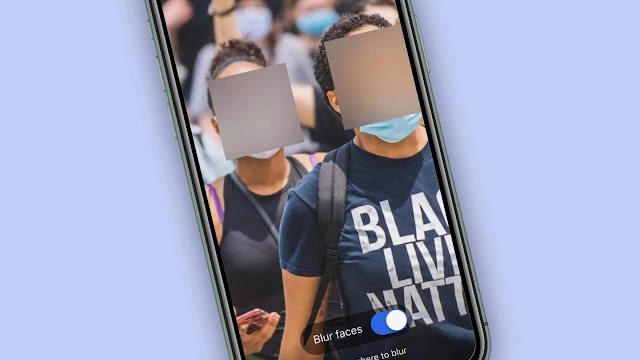
Signal Messenger is arguably the most secure messaging platform, which now, has rolled out a new face-blurring feature that enable users to blur faces when sharing photos on the platform.

The new face blur feature is available in the image editor in the latest version of Signal for Android and iOS; it serves to help protect the privacy of the people in photos shared on the platform. And it is coming on the heels of the protests against racism in US which has broken an unprecedented record in multiple cities over the death of George Floyd, who was killed by a white US cop.

Now, it’s pretty easy to hide a face, or draw a fuzzy trace over a place you want to erase by simply tapping on the new blur tool icon to get started.

How the Signal Messenger Blurring Tool works?


The new blur tool leverages on platform-level libraries for Android and iOS to maintain high privacy, with all of the processes happening locally on your device.

Blur toolbar


While these system libraries are not perfect, as they don’t detect every face 100% of the time, which flaws and potential biases makes it important to extend their default functionality with the blur brush to manually obscure faces or areas in a photo.

The face-blurring feature update has been pushed to the app stores, and will be rolling out as soon as possible.

What necessitated the Face-blurring tool?


As many of the people organizing the US rally are using Signal to communicate, Signal in support of the people who have gone into the streets to make their voices heard, decided to introduce a tool that ensures their privacy.

The company is also working hard to keep up with the increased traffic, with the mapping out of additional ways to support everyone on the street.

Albeit perhaps, the year 2020 is a pretty good one to cover your face.

Signal rolls out face-blurring feature to its Messenger for iOS and Android


Skype has launched a new video conferencing service known as Meet Now, that will enable users to create a live link for meeting and share it for participants to join.

The Meet Now feature allow users to organize a meeting on Skype in three simple steps without the need to install the official app, quite similar to Google Meet where users don’t have to sign up to make free conference calls.

Microsoft is perhaps looking to tap into the on-demand video conferencing service which is getting more attention, owing to the global lockdown that has forced many organizations to consider having their employees work from home.

Skype Meet Now As Alternative to Zoom Video Conferencing Service


Zoom Meetings offers a high-quality audio and video call capability to aid business video conferences, with a capacity of about 1000 participants in a single meeting and having 49 of the participants shown live on PC screen at a time.

Such online tools, like Zoom that facilitate video conferencing have become the favorites of many Work at Home employees, as the Zoom meeting app is very easy to use. Albeit, the Zoom service is lately saddled with several privacy issues, including failure to implement End-to-End encryption as claimed by the app maker.

As a result of the several privacy issues, many Zoom users are considering to switch to alternative services, which Microsoft is offering in Skype Meet Now to facilitate free conference service.

Getting Started with Skype Meet Now


Skype Meet Now is available as a web service via the official Skype website and to use it, you simply click on ‘Create a free meeting’ to invite participants, after which you can now invite the participants by using the share button or generating a direct invite link.

If the person you've invited has Skype installed, the app will open directly, and in any case that the person hasn't installed the Skype app, the video call will commence on the browser. It allow users to record video calls and save for later view, however, the recordings are stored for only 30 days.

Skype Meet Now also afford users the option to blur the background of video calls before entering a conference. And during a meeting you can open recent chats, view participants currently in the call, share the Meet Now link or start the recording of the call.

Additionally, users are allowed to mute or unmute the microphone, coupled with the ability to share the screen or a reaction to the video call.

Skype Meet Now is Microsoft's answer to Zoom Video Conferencing service


The looming global lockdown has brought Houseparty, a group video chatting service, to limelight through the growing usage of the mobile and desktop application to connect with family and friends.

Now, Facebook is looking to have a taste of the pie, with the launch of native Messenger app for Windows and Mac, which is coming almost 9 years after its initial debut. The app offers same features as the browser version, but easier to keep tab with your chat threads than having Messenger tucked away as one of several tabs.

It allow users on MacOS and Windows computers to video chat and stay connected with friends and family all over the world, especially useful in this crisis period.

Highlight features of the Native Desktop Messenger App


  • Sync across mobile and desktop: Never miss a message or call no matter the device you’re using.
  • Group video call: Now you can stay in touch with family and friends right on your larger PC screen, join a workout, or even host a virtual party.
  • Easy Multitasking: You can easily access your chats, as it pops in and out of the app even while doing other stuff on your computer.
  • Get Notifications: You'll receive notifications for new messages, so that you can quickly look up the chat. But still, you’re in control by either muting and snoozing the notifications.


How to get Started with the Messenger Desktop App?


The Messenger app is now available on the Microsoft Store and Mac App Store, so you can download the respective app for your platform, to start messaging friends and family, with group video calls, just like on the mobile and web versions. It includes Dark Mode and GIFs, and everything else you love about Messenger, but on a bigger screen.

Facebook is still rolling out dark mode as one of the new features coming to the redesigned desktop version.

The launch of a native desktop app for Messenger has indeed been a long time coming, with earlier hints that Facebook was working on such app in 2016.

Facebook takes on Houseparty with Native Messenger App for Windows and Mac


The Rich Communications Services (RCS), a robust messaging standard comes as an upgrade to SMS and MMS, bringing features found in third-party services like WhatsApp to basic text messaging, such as real-time typing and read notifications, location update, and emoticons support.

While the standard was initially formed by group of leading mobile industry players in 2007, and officially adopted by GSMA in 2008 with a Steering Committee established, the GSMA later entered into partnership with Google and 15 global carriers to push the adoption of Rich Communication Services (RCS).

Now, the following mobile carriers in the United States, namely Verizon, Sprint, AT&T and T-Mobile have finally gotten the approval to offer a universal cross-carrier communication standard for the next-generation RCS messaging service.

The leading mobile carriers will replace SMS with RCS mobile messaging standard, and are already working with interest groups and other connected mobile companies to deploy the new RCS standard in text messaging app for Android phones which is expected to be fully launched by 2020.


This joint venture is dubbed the Cross Carrier Messaging Initiative (CCMI), and meant to deliver the Rich Communications Service (RCS) industry standard to consumers of the four carriers in the United States and subsequently to the global markets.

But RCS-based messages aren't end-to-end encrypted, and Apple, one of the leading mobile player, seems to have no interest in RCS as it already offers more than the technology is promising on iMessage.

The above points have hindered the general adoption of the standard, coupled with complicated mobile carrier and phone maker policies, with carriers and service providers offering to implement non-universal specifications for RCS standard, which limits the RCS-based messages only to the subscribers of the networks.

On the security front, RCS involves message verification and certification mechanisms which ensures that users interact with legitimate brands, thus protecting them from fraudulent activities from impersonators, or phishing attacks. Additionally, RCS message traffic via the device and network can be protected using SIP-over-TLS encryption protocol.

The new RCS technology is really exciting because it brings the capabilities of messaging systems like Apple's iMessage and special services such as Telegram to basic SMS regardless of device. Also, the RCS capabilities expand beyond messaging, as it works with contacts app, for instance, it can enable you to see who else in your phonebook has got support for the new technology.

GSMA moves to replace SMS/MMS with RCS Messaging Standard by 2020