People in the construction industry experience burnout when they work for long hours with heavy work pressure. Anxiety and burnout are the main reasons for burnout. It affects the workers’ health, and many working days are lost due to work-related health issues.

A data collection app makes the job easier and more efficient for people in the construction industry. The real-time data collected includes the number of hours worked, daily reports, the materials used, and safety checklists.

Production tracking is also a significant benefit of using the software. Nearly 92% of construction employees own a smartphone, and the app connects people working on the site and in the office to share data immediately.

Work updates are available to the field officers and the clients in real-time, and it helps save time and improve work efficiency. Plans in the construction industry constantly change due to architectural changes or weather. Generally, people use pen and paper to document the changes.

It takes more time to record the changes, and human errors may occur. Data collection software helps in easy documentation of data on the site, and the entire team gets instant updates on productivity and safety. The software makes data collection easy and accurate and eliminates the possibility of things getting overlooked.

The need for data collection software


Several people like project owners and subcontractors are involved in a single construction project. Clear communication between them is needed to complete the project efficiently.

When communication and documentation are done using pen and paper, data can get lost or misplaced easily. Mobile data capture keeps the data safe and easily accessible by all. There are no delays in communication as the data is visible to everyone involved in the project.

Pen and paper documentation is made manually, and it has an opportunity for mistakes and human errors. Mobile data collection saves time, reduces errors, and eliminates the need for copying information.

The most significant advantage of using the software is it allows people to see how much the project is completed each day. It helps to make better decisions that help to save money.

Benefits of using data collection app


Time tracking


Manual time tracking is a challenging job and is not very efficient, but with the use of software for timesheets, it could be a different story. The workers have to be tracked constantly for entering data into the payroll system.

The data capture app replaces the pen and paper system by allowing workers to log in and out from their smartphones and sync the time entries directly with payroll. The GPS ensures that the workers enter the time at their respective job sites. The field managers can set alerts and reminders for missing time entries.

Digitize reports


It is tough to share important data with the team members when they are documented using pen and paper. The software eliminates the use of pen and paper and saves time. It instantly captures photos and field data and attaches them to the job information. The data is captured in real-time and shared quickly with others.

Sync data


The data is integrated with back-office systems like payroll and accounting by using the software. It eliminates manual data entry and allows the automatic movement of data from one system to another. Data synchronization saves time and stops businesses from worrying about data entry.

A data collection app is needed to handle the burnout caused by excessive stress in the construction industry. It increases productivity and improves the lives of people working on a project. The app prevents people from losing their energy and interest in the project and focusing better to deliver highly valued results.


Combating burnout in the construction industry

The global supply chains help industries and manufacturers to be more profitable and efficient by decreasing costs and helping businesses to flourish in the international markets.

Therefore, the prime motto of supply chain management is ensuring that the entire international network of vendors, manufacturers, transportation companies, warehouses, retailers, and distributors operate smoothly and efficiently.

Global Supply Chain Management - An Overview


For the past several decades, one of the most prevailing trend is the process of globalization, where several businesses and manufacturers strive to take advantage of the low-cost manufacturing system and abundant raw materials available in developing countries across the world.

Global supply chains – to be very specific, are the network of logistic, manufacturing, communication firms, and transportation that shifts materials and products through the help of worldwide distribution channels and production. The global supply chain management process ensured the security and on-time delivery of anything and everything. It includes primary or raw materials required for production to the final finished products, in their journey from suppliers and manufacturers to the wholesalers, or perhaps the people who work as retailers, etc.

The supply chain managers ensure cost reduction, efficiency improvement, and all sorts of risks.

What is causing global supply chain issues?


There are primarily three major reasons that are causing global supply issues. First, the pandemic has left with a shortage of manpower, and eventually, that has reduced the production capability worldwide.

Distortions to demand due to the change in customer purchasing manner are another reason behind global supply chain issues, and the manufacturing and logistics systems more often run near or at their maximum capacity.

Manufacturing


Nowadays, ports, factories, and trucking capacity have become very expensive. Thus, they are designed in such a way that there is always a scope of high utilization. This means that each of them does not have a huge capacity.

Functioning close to capacity helps manufacturing and distribution cost-effective. But this also means that it does not require much to overwhelm them. This is because it is not taking place at one point but several points on a global supply chain and it becomes difficult to maintain the supply and demand balance

Irregular stress on demand


In the post-COVID era, businesses have seen increased demand, but it is not quite balanced. However, this has made companies scramble to keep up with the demand. This is creating a kind of irregular ripple effect in the supply chain.

Every business anticipates a probable future increase in demand based on the current rise in demand. In a supply chain where every business simultaneously supplies and orders products and services. A slight increase in need at the bottom of the chain creates a ripple effect, creating a considerable demand in the other end of the chain.

What's in store for the future?


One effect of this global supply chain disruption is that customers will find a surplus of earlier items hard to see during the COVID days. This disruption will stay for some time before it stabilizes again.

Businesses recovering from the sloth during the pandemic need to acknowledge this disruption in the supply chain. They need to revisit their disruption mitigation plans and strategies and build more resilience.

Conclusion


Despite all the hardships in supply chain management, opportunities will keep coming. A business more resilient to the distortions will eventually prosper from it. So, a company should not lose heart but keep up with the hard work.

What is causing Global Supply Chain issues?

People extensively use computers for business and personal use. However, many dangers lurk during their usage. A computer security risk refers to an action or event resulting in data loss or hardware or software damage.

It can also result from incorrectly configured hardware or software, weak passwords, and unpatched software. An unethical act involving a computer security risk is a computer crime.

Today, businesses can avail of security risk and compliance services that help them to analyze the efficacy of their security controls, minimize business risk, and increase brand reputation by plugging gaps in their security strategy. They can get compliance services suited to their business needs.

What a Computer Security Risk Implies


A computer security risk is essentially anything on your system that can damage your data or enable unknown access to it. Malware or harmful software is one of the significant things that pose a computer risk.

Other types of bad software like ransomware, worms, viruses, spyware, and Trojan horses can also result in a security risk. A professional security risk service gives you complete visibility of your digital assets.

Thus, you can pinpoint places where your enterprise could be exposed to varied attacks through it.

What Are Viruses, Worms, and Ransomware?


  • Viruses are attached to files on your computer and can potentially destroy your data. They need human interaction to spread rapidly from system to system.
  • Worms are similar to viruses. But they can quickly spread from system to system without any human interaction. They know ways to attach themselves to devices like removable hard drives. They also know how to move through the network via automation and shift to connected machines.
  • Ransomware is a recent malware term. It refers to malware that renders all the files unreadable after getting installed on the system. They hold the user’s data hostage till they pay the hacker the ransom they demand. This malware type gets delivered by a virus or worm. You don’t have any guarantee of data restoration even after you pay the ransom.


What are Spyware and Trojan Horses?


Spyware refers to malware that takes away your data. It is used to spy over you through your microphone or webcam. Once your computer has spyware installed in it, your sensitive data gets taken away via the recording of your login information.

It will also get stolen by searching for confidential files on your device. This data is transmitted back to the attacker. All this takes place without your knowledge. Trojan Horses refer to a different type of virus.

Their name comes from the wooden horses that ancient Greeks employed to penetrate the walled city of Troy. Trojan Horse viruses are employed to deliver other kinds of malware via hiding them within files or programs that, on the surface, look legitimate.

Misconfiguration of PC


Misconfiguration of PC is like an unsafe computing practice and poses an additional risk. Misconfigured software makes the computer unsafe. They all contribute to building a computer security risk. Computer security risk is constantly developing these days.

So, business owners must take decisive steps to prevent it. Expert security risk and compliance services perform detailed attack simulations through advanced tactics. It imparts security assurance to the enterprise.

These services allow companies to recognize attack surfaces and test security controls and processes in their organization. Thus, they make way for a safe working environment for businesses entirely free of risks. It ultimately prevents the loss of crucial data, which is imperative for company growth.

What does Computer Security Risk mean?

Data collection apps are applications that are used by businesses to collect data from their consumers, the services they provide, and the quality of the services. Data collection apps are also used to collect data from the environment, from employees, and the customers themselves.

Data Collection Apps are used by companies to collect data from their clients. Data Collection Apps are used to create a database of information from the users which could then be analyzed to make improvements.

Data collection apps are becoming more prominent in today's world. Data collection apps help collect the data for business. There are many different types of data collection app.

There are apps that are used to gather data from surveys and polls, apps that are used to collect information from devices like wearables, apps to collect data from running, swimming, cycling, and many more. Data collection apps can be used to collect data in a variety of fields. They are used in medical, sports, business, and personal fields.

Uses of Data Collection Apps


1. Easier to Collect Data


Data collection apps are also used to collect data from the environment, from employees, and the customers themselves. Data collection apps are used by companies to collect data from their clients. Data collection apps are used to create a database of information from the users which could then be analyzed to make improvements.

2. Easy to Compile Data


Data collection apps are the most efficient way to compile and organize data from one central location. The next time you find yourself in a situation where you need to make a list, whether it be a grocery list, a list of items to take on a trip, or even a list of goals you want to accomplish, you should consider using an app like Google Keep or Evernote.

3. Easy to Share


You can keep notes, make lists, and compile information all in one place, which is easily accessible on any device. These apps make it easy to share information with others, so you can stay organized, even if you are working with others.

How Data Collection Apps are Reducing Paper Work


Data collection apps are the best way to get rid of paperwork. Data collection apps are used to optimize and enhance business processes by gathering data from employees, customers, and vendors. It is a tool that you can use to collect data from various sources, organize, analyze and report back to the users.

It is being used by both small and large-scale enterprises to achieve business goals. Data collection apps are used to collect data from various sources. By accessing the data through the app, you can easily analyze the data and create reports. Here are some of the benefits that you can enjoy by using data collection apps.

There are different types of data collection apps, if you are looking to invest in a data collection app make sure you understand the requirements of your business and invest in the application accordingly. Do your research and choose the one that matches well with the requirements.

How Data Collection Apps Reduces Paperwork?

As kids now spend most of their time online, and therefore, exposed to trolling, bullying and other online vices, concerned parents are always looking out for the best app to monitor their kids' activities on iPhone or Android.

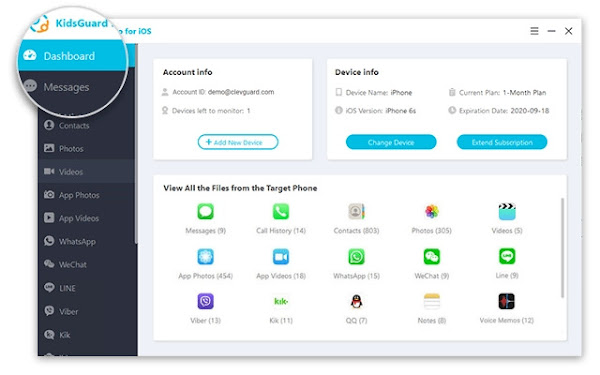
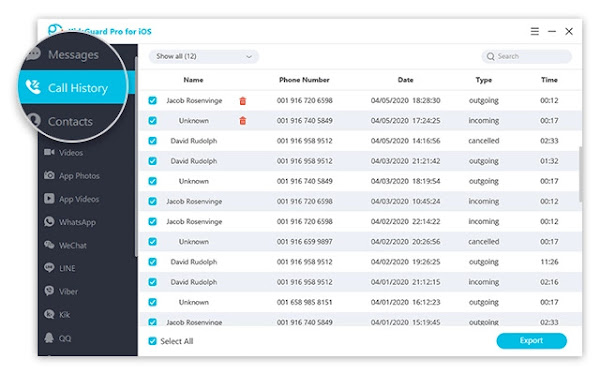
KidsGuard Pro is perhaps the most reliable monitoring software for iPhone and Android devices. The application comprises voice and location packages, capable of recording both the incoming and outgoing calls, as well as text and instant messenger chats.

While Android devices have become hugely popular over other rivals, especially because of its affordability and also, flexibility, most users still want some anonymity with their devices.

It’s no longer news that iOS is now expressly available for the iPhone line of devices. The move drew a parallel line between the iPhone and iPad, with different features for the two hardware to cater for the needs of the user base.

Some Unique Features of KidsGuard Pro for iPhone and Android


  • Sync data over Wi-Fi
  • Requires No Rooting or Jailbreak
  • Supports over 20 files on iPhone
  • 30+ files on the Android version
  • Capable of Monitoring Even Deleted Files
  • Effortless Installation within only 5 minutes
  • Monitor target’s iCloud data, even without iPhone


NB: Rooting your phone makes it vulnerable to malware attacks, therefore, KidsGuard Pro has some advantages as it can monitor without rooting, while most other such apps require you to root or jailbreak your device.

Steps to Setup KidsGuard Pro for iPhone Monitoring


Step 1


Start by registering an account for KidsGuard Pro and purchase a valid subscription plan. Then proceed to download and install KidsGuard Pro iPhone app onto the PC to be used to monitor the iOS device.


Step 2


To scan the target device and get data, there are two options, either, you connect the iPhone to target's frequently used computer with USB cable to back up data or backup the iPhone remotely over Wi-Fi.. So, you have to choose from the two options to commence the scanning.

Step 3


Once the scanning process is completed, you can now switch between different file types to view details. Also, the deleted files can be checked, that is, if you want complete insight on the monitored data, especially for call logs and chat history files.


NB: KidsGuard Pro is a PC-based software and so, can only be used on a PC or Mac for the monitoring. If there is a pop-up that says " Windows protected your PC" when installing the app on your Windows PC, you simply need to click on the " More info " tab underneath the description. And then, select " Run anyway " to continue the installation of the program on the computer.

Our Recommendation!


KidsGuard Pro is without doubt one of the best available monitoring apps for iPhone and Android. It also allows you to check the content added in Calendars, Notes or Reminder apps on the monitored iPhone or Android device. And the best part, it is reasonably priced.

KidsGuard Pro Review: Monitor Your Child’s Activities on iPhone or Android

Kali Linux team emphasizes on a major visual changes to their 20xx.1 release, that is the first release of every year. And Kali Linux 2022.1 release brings in new visual refresh and a new flavor known as offline ISO.

There are several other improvements with Linux Kernel upgrade, some new hacking tools, live VM support, Apple M1 support, and more. Let us look at the major highlights for Kali Linux 2022.1.

What's new in Kali Linux 2022.1 Release?


Kali Linux features like drag ‘n’ drop, copy/paste have now been enabled by default to give users a better experience in a VM with i3.


And the new flavor, that comes as a standalone offline ISO includes everything from “kali-linux-everything” packages, offering you the ability to download an offline ISO without needing the packages installation separately.

Kali Linux 2022.1 brings new tools with some worthy of them highlighted below:

  • New packages for ARM64 architecture including feroxbuster
  • Enable legacy algorithms, ciphers, SSH using a setting in kali-tweaks
  • Accessibility improvements for speech synthesis in the Kali Linux
  • Introduction of some new tools like email2phonenumber, dnsx, naabu, and proxify


Also, there are tweaks to remove the exit code, skull icon, and number of background processes, with significant improvements for desktop and Raspberry Pi.

How to Download and Install Kali Linux 2022.1 Release?


For existing users of Kali Linux, a quick update can be performed using the following commands:
echo "deb http://http.kali.org/kali kali-rolling main non-free contrib" | sudo tee /etc/apt/sources.list sudo apt update && sudo apt -y full-upgrade cp -rbi /etc/skel/. ~ [ -f /var/run/reboot-required ] && sudo reboot -f


And for new users, its ISO is available in the official site for download, but note that ‘Everything’ flavor is available only via Torrents.

Kali Linux 2022.1 Release: New Everything Offline ISO

Privacy Sandbox is a set of security features that will phase out cookies and fingerprinting, by reducing the amount of user information sites can access in order to keep tabs on users' privacy.

Google has announced a multi-year initiative to setup Privacy Sandbox on Android, with more private advertising solutions. These solutions will limit the sharing of users data with third parties and operate without cross-app identifiers, like advertising ID.

According to the company, Mobile apps as core part of everyday lives, with over 90% of the apps on Google Play being free, offering access to valuable content and services to billions of users and digital advertising plays a key role in making this possible.

A different Approach to ads privacy, bluntly restricting existing technologies


The goal of the Privacy Sandbox on Android is to develop effective privacy and enhancing advertising solutions, whereby users can know that their information is protected, and developers have the tools to succeed on mobile.


Google plans to support existing ads platform features for at least two years, and intend to provide substantial notice ahead of any future changes. This initiative needs input from across the industry to succeed. The company already heard from many partners on their interest in working to improve ads privacy on Android, and more organizations are invited to participate.

Developers can review the initial design proposals and share feedback on the Android developer website. There is plan to release developer previews over the course of the year, with a beta release by the end of the year. With regular updates provided on designs and timelines, so you can also sign up to receive updates.

Privacy Sandbox coming to Android for User Data protection

A joint security advisory from CISA, FBI, NSA warns of increase in sophisticated, high-impact ransomware attacks that target critical organization's infrastructure across the world.

The advisory highlighted a broad range of industries targeted, which include agriculture, defense, emergency services, government facilities, IT, healthcare, financial services, legal institutions, public services, education, and energy. The common infection techniques employed are spear-phishing, brute-forced Remote Desktop Protocol (RDP) credentials stealing, and exploitation of software bugs, with the infection vectors used to deploy ransomware on compromised networks.

According to the Cybersecurity authorities, the market for ransomware became increasingly “professional” in 2021, with cybercriminal using services-for-hire business model now well established.

Tactics, Techniques, and Procedures (TTPs) used by criminals for Ransomware attacks?


The major tactics among cyber criminals in gaining access to networks are via phishing, stolen RDP credentials or brute force, and exploiting known vulnerabilities in software.


While phishing emails, RDP and exploitation of vulnerabilities remained the top infection vectors for ransomware incidents in 2021. And if a threat actor gains code execution on a device or network, ransomware can be easily deployed. These infection vectors remain popular because of their increased use starting in the previous year and continuing into 2021.

The expanded remote attack surface leave network defenders struggling to keep pace with routine security patching, and as ransomware groups share victim information with each other, diversifying the security threat on targeted organizations.

How to Mitigate against Ransomware attacks?


It is recommended that network defenders should apply the following mitigations to reduce the likelihood or impact of ransomware attacks:

Keep all software up to date: including timely security patching which is the most efficient and cost-effective step to minimize exposure to security threats.

Also, if your organization uses RDP or other potentially high risk service, there is need to secure and monitor them closely, with regular checking for notifications, and prioritize applying patches for known vulnerabilities. And automate security scanning and testing, when possible if upgrading hardware or software, to take advantage of vendor-provided security capabilities.

Cybersecurity Authorities warns of Sophisticated, High-impact Ransomware attacks

Slackware, one of the oldest Linux distribution, has received a new update after several years, with the latest version having been released in 2016.

The Slackware team starting with an alpha release, went on to release candidates (Two), and finally Slackware Linux 15.0 is now available for the public. Slackware 15.0 has undergone a lot of changes, such as the addition of the latest Linux Kernel 5.15 LTS and KDE Plasma 5.23, which brings enhanced NTFS driver and Apple’s M1 chip support, among others.

Indeed, Slackware 15.0 is an exciting release, as it also offers support for Intel 12th gen processors. Let’s dive into what’s new in Slackware 15.0.

What’s New in Slackware 15.0 Release?


Slackware 15.0 has the major addition of the latest Linux Kernel 5.15 LTS, which guarantees a great hardware compatibility experience for what's perhaps the oldest running Linux distro.


The KDE Plasma packages has been updated to 5.23, with KDE Frameworks updated to version 5.88; and KDE Plasma 5.23 included several UI improvements, and a range of cosmetic changes that improves the user experience. Also, the updated Xfce 4.16 comes bundled with Slackware 15.0, among the desktop environment options.

Highlighted below are other important additions:

  • From Qt4 to Qt5
  • Support for Wayland
  • Improvements in the Slackware pkgtools
  • Includes a “make_world.sh” script for rebuilding the OS from source code
  • SMP and non-SMP kernels for single-core and multi-core processors
  • Support for Privileged Access Management (PAM)
  • Support for UEFI and old systems
  • GCC compiler upgraded to version 11.2.0
  • Support for PipeWire


Furthermore, all the essential packages like Krita, Network Manager, OpenSSH, and Ocular also got an upgrade. With important apps like Firefox, Falkon browser and Thunderbird updated to their latest available releases as well.

How to Download and Install Slackware 15.0?


Kindly note that upgrading from older versions such as Slackware 14.2 isn't feasible, it is advised that you do a fresh installation.

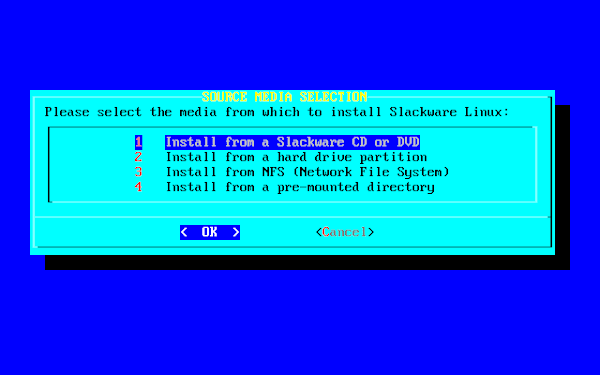
And for a fresh installation, you should checkout the upgrade instructions available here, and you can install the new ISO from the official website.

Slackware 15.0 Release: What’s New?

SEO poisoning involves creating malicious websites loaded with keywords, and other search engine optimization techniques to make the pages show up prominently in search results.

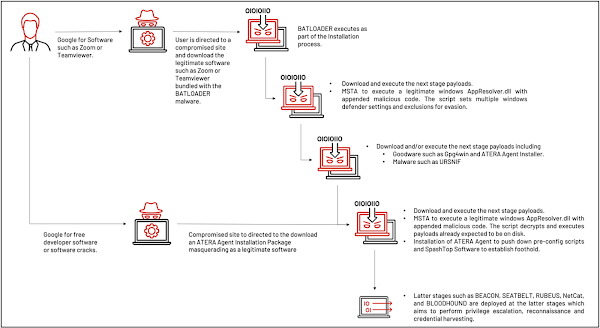
There's an ongoing SEO poisoning attack campaign, according to researchers at Mandiant, that abuse trusted legitimate software utilities to trick web users into downloading the infamous malware, BATLOADER, on their machines.

The team also observed a crafty defense evasion technique employed by the hackers using mshta.exe, a Windows-native utility designed to execute Microsoft HTML Application (HTA) files.

How Hackers use SEO Poisoning to Distribute BATLOADER malware?


In the SEO poisoning campaign, the hackers often use “free productivity apps installation” or “free software development tools installation” as keywords to lure unsuspecting users to a compromised website to download a malicious installer.


While the installer contains a compromised version of the legitimate software bundled with the BATLOADER malware, and the malware is executed during the software installation process. This initial phase is the beginning of a multi-stage infection chain which provides the hackers with a strong foothold within the target organization.

And such legitimate tools as Msiexec.exe, PowerShell, and Mshta.exe allow proxy execution of the malicious payloads which enables the hackers to avoid detection.

How to Mitigate against SEO Poisoning Attack?


The public release of this information, means that other unaffiliated threat actors would be replicating the techniques for their own malicious motives and objectives.

Therefore, organizations are recommended to follow a holistic security system that mapped to the MITRE ATT&CK framework and includes related intelligence so they can take decisive action throughout their environment.

Hackers resort to SEO Poisoning to Distribute BATLOADER malware