Showing posts with label Featured Posts. Show all posts
Have you ever desired that Live Voice Changer software to change your voice easily on Mac and PC, including Male to Female, Ghostface, Anime, Deep Voice voice changer and more?

Even if you want to Prank your friends with funny voices and some cool sound effects in games, chats and live streaming? iMyFone MagicMic is an amazing voice changer software, which you can customize to your own soundboard. As an excellent soundboard for Mac and PC, MagicMic will help you to create a wonderful online experience with a natural Voice changer for Discord, Fortnite, Zoom and many more.

The voice changer software can also be used for creating videos for various purposes, and there are many use cases, but with so many options, it's hard to choose the right real-time voice changer tool.

Some Unique Features of iMyfone MagicMic


  • Fully supported on Windows 7, 8, 8.1, 10, and 11
  • Change Your Voice with Various Voice Filters in Real-Time
  • Voice Emulator Directly in Games or Other Applications
  • Over 200 Voice Effects to Use on Your Favorite Programs


How to Configure iMyFone MagicMic


First download and install iMyFone MagicMic on PC or Mac, and launch the software, if perhaps this is your first time running MagicMic, there are setup instructions you have to follow.



Launch the Voice Changer with different voices available, separated into categories such as Voices for Male, Voices for Female, Background Voices, Fantasy Voices, and many more.
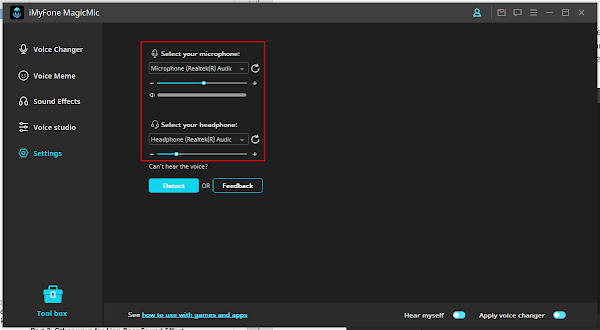


Then you’ll have to choose what output and input method to use as voice changer. The input device should be your microphone and the output device will be your headphones. You can always access this section under the Settings tab if you need to change anything.
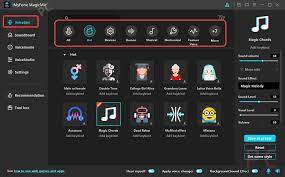


Start your desired program. Then go into the Voice Settings menu. Pick “Microphone” (Voice Changer Virtual Audio Device, or WDM) as an input device. Also, the voice can then be changed in real-time in the program that was selected.

Conclusion


As a professional voice changer for both PC and Mac, with Discord to distort your voice to make it unrecognizable, it has both creative, pragmatic and fun reasons.

And finding a reliable voice changer for Discord isn't really an easy task since the internet is full of fake tools, all claiming to be the best.

MagicMic Review: Best Free Voice Changer for Mac and PC

People in the construction industry experience burnout when they work for long hours with heavy work pressure. Anxiety and burnout are the main reasons for burnout. It affects the workers’ health, and many working days are lost due to work-related health issues.

A data collection app makes the job easier and more efficient for people in the construction industry. The real-time data collected includes the number of hours worked, daily reports, the materials used, and safety checklists.

Production tracking is also a significant benefit of using the software. Nearly 92% of construction employees own a smartphone, and the app connects people working on the site and in the office to share data immediately.

Work updates are available to the field officers and the clients in real-time, and it helps save time and improve work efficiency. Plans in the construction industry constantly change due to architectural changes or weather. Generally, people use pen and paper to document the changes.

It takes more time to record the changes, and human errors may occur. Data collection software helps in easy documentation of data on the site, and the entire team gets instant updates on productivity and safety. The software makes data collection easy and accurate and eliminates the possibility of things getting overlooked.

The need for data collection software


Several people like project owners and subcontractors are involved in a single construction project. Clear communication between them is needed to complete the project efficiently.

When communication and documentation are done using pen and paper, data can get lost or misplaced easily. Mobile data capture keeps the data safe and easily accessible by all. There are no delays in communication as the data is visible to everyone involved in the project.

Pen and paper documentation is made manually, and it has an opportunity for mistakes and human errors. Mobile data collection saves time, reduces errors, and eliminates the need for copying information.

The most significant advantage of using the software is it allows people to see how much the project is completed each day. It helps to make better decisions that help to save money.

Benefits of using data collection app


Time tracking


Manual time tracking is a challenging job and is not very efficient, but with the use of software for timesheets, it could be a different story. The workers have to be tracked constantly for entering data into the payroll system.

The data capture app replaces the pen and paper system by allowing workers to log in and out from their smartphones and sync the time entries directly with payroll. The GPS ensures that the workers enter the time at their respective job sites. The field managers can set alerts and reminders for missing time entries.

Digitize reports


It is tough to share important data with the team members when they are documented using pen and paper. The software eliminates the use of pen and paper and saves time. It instantly captures photos and field data and attaches them to the job information. The data is captured in real-time and shared quickly with others.

Sync data


The data is integrated with back-office systems like payroll and accounting by using the software. It eliminates manual data entry and allows the automatic movement of data from one system to another. Data synchronization saves time and stops businesses from worrying about data entry.

A data collection app is needed to handle the burnout caused by excessive stress in the construction industry. It increases productivity and improves the lives of people working on a project. The app prevents people from losing their energy and interest in the project and focusing better to deliver highly valued results.

Combating burnout in the construction industry

The global supply chains help industries and manufacturers to be more profitable and efficient by decreasing costs and helping businesses to flourish in the international markets.

Therefore, the prime motto of supply chain management is ensuring that the entire international network of vendors, manufacturers, transportation companies, warehouses, retailers, and distributors operate smoothly and efficiently.

Global Supply Chain Management - An Overview


For the past several decades, one of the most prevailing trend is the process of globalization, where several businesses and manufacturers strive to take advantage of the low-cost manufacturing system and abundant raw materials available in developing countries across the world.

Global supply chains – to be very specific, are the network of logistic, manufacturing, communication firms, and transportation that shifts materials and products through the help of worldwide distribution channels and production. The global supply chain management process ensured the security and on-time delivery of anything and everything. It includes primary or raw materials required for production to the final finished products, in their journey from suppliers and manufacturers to the wholesalers, or perhaps the people who work as retailers, etc.

The supply chain managers ensure cost reduction, efficiency improvement, and all sorts of risks.

What is causing global supply chain issues?


There are primarily three major reasons that are causing global supply issues. First, the pandemic has left with a shortage of manpower, and eventually, that has reduced the production capability worldwide.

Distortions to demand due to the change in customer purchasing manner are another reason behind global supply chain issues, and the manufacturing and logistics systems more often run near or at their maximum capacity.

Manufacturing


Nowadays, ports, factories, and trucking capacity have become very expensive. Thus, they are designed in such a way that there is always a scope of high utilization. This means that each of them does not have a huge capacity.

Functioning close to capacity helps manufacturing and distribution cost-effective. But this also means that it does not require much to overwhelm them. This is because it is not taking place at one point but several points on a global supply chain and it becomes difficult to maintain the supply and demand balance

Irregular stress on demand


In the post-COVID era, businesses have seen increased demand, but it is not quite balanced. However, this has made companies scramble to keep up with the demand. This is creating a kind of irregular ripple effect in the supply chain.

Every business anticipates a probable future increase in demand based on the current rise in demand. In a supply chain where every business simultaneously supplies and orders products and services. A slight increase in need at the bottom of the chain creates a ripple effect, creating a considerable demand in the other end of the chain.

What's in store for the future?


One effect of this global supply chain disruption is that customers will find a surplus of earlier items hard to see during the COVID days. This disruption will stay for some time before it stabilizes again.

Businesses recovering from the sloth during the pandemic need to acknowledge this disruption in the supply chain. They need to revisit their disruption mitigation plans and strategies and build more resilience.

Conclusion


Despite all the hardships in supply chain management, opportunities will keep coming. A business more resilient to the distortions will eventually prosper from it. So, a company should not lose heart but keep up with the hard work.

What is causing Global Supply Chain issues?

Data collection apps are applications that are used by businesses to collect data from their consumers, the services they provide, and the quality of the services. Data collection apps are also used to collect data from the environment, from employees, and the customers themselves.

Data Collection Apps are used by companies to collect data from their clients. Data Collection Apps are used to create a database of information from the users which could then be analyzed to make improvements.

Data collection apps are becoming more prominent in today's world. Data collection apps help collect the data for business. There are many different types of data collection app.

There are apps that are used to gather data from surveys and polls, apps that are used to collect information from devices like wearables, apps to collect data from running, swimming, cycling, and many more. Data collection apps can be used to collect data in a variety of fields. They are used in medical, sports, business, and personal fields.

Uses of Data Collection Apps


1. Easier to Collect Data


Data collection apps are also used to collect data from the environment, from employees, and the customers themselves. Data collection apps are used by companies to collect data from their clients. Data collection apps are used to create a database of information from the users which could then be analyzed to make improvements.

2. Easy to Compile Data


Data collection apps are the most efficient way to compile and organize data from one central location. The next time you find yourself in a situation where you need to make a list, whether it be a grocery list, a list of items to take on a trip, or even a list of goals you want to accomplish, you should consider using an app like Google Keep or Evernote.

3. Easy to Share


You can keep notes, make lists, and compile information all in one place, which is easily accessible on any device. These apps make it easy to share information with others, so you can stay organized, even if you are working with others.

How Data Collection Apps are Reducing Paper Work


Data collection apps are the best way to get rid of paperwork. Data collection apps are used to optimize and enhance business processes by gathering data from employees, customers, and vendors. It is a tool that you can use to collect data from various sources, organize, analyze and report back to the users.

It is being used by both small and large-scale enterprises to achieve business goals. Data collection apps are used to collect data from various sources. By accessing the data through the app, you can easily analyze the data and create reports. Here are some of the benefits that you can enjoy by using data collection apps.

There are different types of data collection apps, if you are looking to invest in a data collection app make sure you understand the requirements of your business and invest in the application accordingly. Do your research and choose the one that matches well with the requirements.

How Data Collection Apps Reduces Paperwork?

As kids now spend most of their time online, and therefore, exposed to trolling, bullying and other online vices, concerned parents are always looking out for the best app to monitor their kids' activities on iPhone or Android.

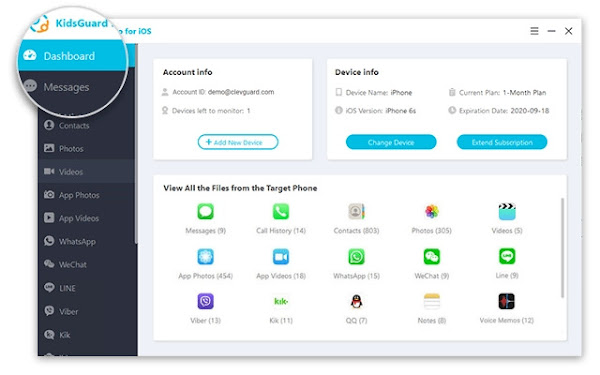
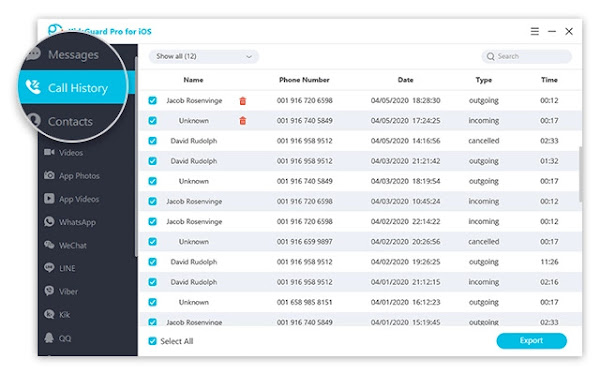
KidsGuard Pro is perhaps the most reliable monitoring software for iPhone and Android devices. The application comprises voice and location packages, capable of recording both the incoming and outgoing calls, as well as text and instant messenger chats.

While Android devices have become hugely popular over other rivals, especially because of its affordability and also, flexibility, most users still want some anonymity with their devices.

It’s no longer news that iOS is now expressly available for the iPhone line of devices. The move drew a parallel line between the iPhone and iPad, with different features for the two hardware to cater for the needs of the user base.

Some Unique Features of KidsGuard Pro for iPhone and Android


  • Sync data over Wi-Fi
  • Requires No Rooting or Jailbreak
  • Supports over 20 files on iPhone
  • 30+ files on the Android version
  • Capable of Monitoring Even Deleted Files
  • Effortless Installation within only 5 minutes
  • Monitor target’s iCloud data, even without iPhone


NB: Rooting your phone makes it vulnerable to malware attacks, therefore, KidsGuard Pro has some advantages as it can monitor without rooting, while most other such apps require you to root or jailbreak your device.

Steps to Setup KidsGuard Pro for iPhone Monitoring


Step 1


Start by registering an account for KidsGuard Pro and purchase a valid subscription plan. Then proceed to download and install KidsGuard Pro iPhone app onto the PC to be used to monitor the iOS device.


Step 2


To scan the target device and get data, there are two options, either, you connect the iPhone to target's frequently used computer with USB cable to back up data or backup the iPhone remotely over Wi-Fi.. So, you have to choose from the two options to commence the scanning.

Step 3


Once the scanning process is completed, you can now switch between different file types to view details. Also, the deleted files can be checked, that is, if you want complete insight on the monitored data, especially for call logs and chat history files.


NB: KidsGuard Pro is a PC-based software and so, can only be used on a PC or Mac for the monitoring. If there is a pop-up that says " Windows protected your PC" when installing the app on your Windows PC, you simply need to click on the " More info " tab underneath the description. And then, select " Run anyway " to continue the installation of the program on the computer.

Our Recommendation!


KidsGuard Pro is without doubt one of the best available monitoring apps for iPhone and Android. It also allows you to check the content added in Calendars, Notes or Reminder apps on the monitored iPhone or Android device. And the best part, it is reasonably priced.

KidsGuard Pro Review: Monitor Your Child’s Activities on iPhone or Android

Many people are employed in small businesses in Vancouver, WA, from accountancy firms and delivery companies to management or engineering industries and stylists. Invariably, the competition is tougher among these businesses to outdo one another in a cut-throat market.

By hiring Vancouver SEO services, local businesses can effectively adjust their online presence and become more visible and accessible to the public. It is among the most cost-effective and prudent marketing strategies to help Vancouver businesses scale new heights with ease.

3 Ways SEO can BENEFIT SMALL BUSINESSES IN VANCOUVER, WA


Here’s a list of some very incredible ways in which hiring a local SEO service provider can change your business for the better.


Attracts Customers Via Organic Search


Vancouver city is highly supportive of small businesses and is continually looking to launch new schemes and programs to help them flourish. Besides help from the city authorities, small business owners in Vancouver can boost their profits and overall performance by having a robust online presence. They can do this by hiring local SEO experts to work on their website and make it more accessible to city residents.

A fantastic advantage of SEO is that it can draw in many local customers to your website because over fifty percent of all web traffic comes from organic searches.

Moreover, many digital marketers can testify that most of the leads come from SEO-engaged website visitors in not just Vancouver but all of the United States.

Enhances Brand Recognition


When you permit reliable and reputed Vancouver SEO professionals to work on your website, they can do wonders within a short period. For one, they can make the web pages more user-friendly, ensuring visitors stay for a longer time on the website. More importantly, they can use local SEO to help your website rank higher on search engines, enabling your brand to become a lot more visible to your customers in Vancouver.

This is critically essential, especially if you are competing with another business for the same search term.

For instance, suppose you offer legal services in Vancouver, and other law offices are vying for the same clients as you. But when you invest in expert local SEO services and they do not, your website will rank while theirs will not. This will enable you to get valuable traffic that can be converted to sales quickly.

Excellent Return on Investment


On average, United States businesses collectively spend a little over 79 billion USD on digital marketing, proving how effective SEO strategies can be. This number is expected to increase vastly in the coming years. The scenario is quite similar in Vancouver and other Washington cities, with local businesses spending a considerable portion of their marketing budget on SEO. But the surprising aspect is that despite how the numbers sound, SEO services are pretty inexpensive to bear for most companies in the city.

Consider it with this example: A Vancouver business-to-consumer product selling company has an annual turnover of $5 million. From the overall marketing yearly budget of $600,000, the company allocates $180,000 to SEO. If the total yearly revenue from marketing is twelve percent, SEO is responsible for a significant portion of this return despite considerably less investment.

Inevitably, investments in SEO companies in the city are expected to grow higher shortly. The primary reason for this is the huge scope of profit that it brings for businesses of all scales and nature.

3 Ways SEO can Benefit Small Businesses in Vancouver, WA

Of course, you want the fastest and the best Internet connection. Every one of the 4.66 billion active Internet users across the globe wants the same thing. By ensuring that your Mac, iPad or iPhone automatically prioritizes and connects to the strongest available Wi-Fi network is going to help you with blazing fast browsing speed.

Regardless of whether you have multiple access points in your house or got a bunch of saved networks in an area, you can get the best connection at all times by simply setting network priority. It is important to know that isn’t an option or button on your Apple devices that just lets you set a Wi-Fi network on priority. This is because your device will connect to one of the available networks automatically and it is typically the one with the best strength.

But, the problem arises when you are in areas with multiple Wi-Fi networks. Then your device might get connected to any one of the saved networks and it might not necessarily be the fastest one. But, you can manually manipulate this. Are you looking to set the Wi-Fi network priority on your Apple devices? Read on to know what you have to do.

Wi-Fi Network on Priority in Macs


macOS is all about user-friendliness and one of the features that are often ignored by Mac users is the ability of their device to prioritize saved networks by the order in which you want Mac to connect to them. This allows you to define which network has a higher priority so that your Mac will connect to them when they’re available and even if you’re working on a different network, your device will switch to the prioritized network when it becomes available.


If your Mac is connected to multiple networks, you can simply delete a Wi-Fi network that isn’t useful to you anymore. This will make sure that your device doesn’t get connected to a network that doesn’t offer you the speed and signal strength that you are looking for. Also, you can forget all of the accumulated networks and add them back again one by one. Remember that the last network which you add is going to be the high priority one.

Next, you can follow these steps:

  • You can access the feature in your Mac that helps you prioritize Wi-Fi by clicking on the Wi-Fi icon in the menu bar and go to Open Network Preferences or you can go to Settings and then to the Network preference pane.
  • From the Network preference pane, make sure that you have selected Wi-Fi in the left sidebar and then from the right sidebar, you have to click on the ‘Advanced’ button which you can find toward the bottom.
  • In the next window, you’ll be presented with a column titled ‘Preferred Networks’ where you’ll find all of your remembered networks and it will be listed. You will notice a ‘+’ and ‘-‘ buttons below that window and these buttons will help you to move the networks up and down according to your preference. So, the networks that you place on top of the list are going to be the high-priority ones and your device will first connect to them if they’re available. To lower the preference of the network, you just need to move it down the list.


When you’re done, simply click OK and your Mac will save those settings.

Wi-Fi Network Priority on Apple iOS


  • Manually connect to a Wi-Fi network – Even though your device will probably automatically connect to a network, but if that is not your preferred network, you can always manually connect. You can do this on iPad, iPhone, and also Mac. On your iPad or iPhone, you can switch Wi-Fi networks from the Control Center or the Settings app. From the Control Center, you have to go to the Wi-Fi icon and from the list of available networks, select one that you prefer.
  • Sync network priority from Mac to iPhone/iPad – If you own a Mac, you can set the Wi-Fi priority there (as mentioned before) and then sync the settings with your iPhone or iPad. You will have to be signed in with the same Apple ID on both the systems and also keep the iCloud keychain turned on. You can check these settings on System Preferences on your macOS and click on the Apple ID. Then make sure that the Keychain box is clicked. On your iPad or iPhone, you have to go to iCloud and then Keychain to ensure that it is toggled on. When both these settings are turned on, it means that you are ready to sync.


In conclusion, prioritizing Wi-Fi networks will most definitely help to bring better connection speed and range. Therefore, you can go ahead and try these hacks out if you want to have a more smoother experience.

How to Set Wi-Fi Network Priority on Apple devices - iPhone, iPad, and Mac?

ImgDownloader is a versatile all-in-one image downloading engine for automatic downloading of images and thus, helping content creators to curate contents easily.

It presents to you a very powerful image downloader tool that enables you to download all images from any site, including Pinterest and Instagram Images which are know to be hard nuts to crack. And ImgDownloader doesn't stop at just images, you can also get videos and MP4 files instantly.

Imagine the sheer possibility of downloading your entire image results in bulk, that is what you get by using ImgDownloader, you can even enter your desired image keyword and preview the images returned through Google’s index, and easily download all or specific image with a single click.

Major Websites that You can download Images in Bulk using ImgDownloader


ImgDownloader works across all websites, including the popular ones listed below which seems to restrict easy download of images.


  • Instagram Image Downloader: Downloading an image from Instagram does not come easy, as the platform makes it very difficult to download and safe images from it. But with ImgDownloader downloading your favorite celebrities images is an simple as a breeze.
  • Google Image Downloader: Are the type that requires bulk image curation from Google and don't know how to go about it? ImgDownloader allows you to download images in bulk using google search engine.
  • Pinterest Image Downloader: Here you can easily download images from Pinterest in just one click.


Additionally, you are not restricted to just these mentioned major image sources, as ImgDownload works across all websites, simply paste the image URL and ImgDownloader will automatically fetch all the images within the web address. It even retrieve images hidden in the CSS/JS files and you can preview all the images, download each of them or use the "Download All" button to get all of them in one click.

How to Download Bulk Images from Instagram using ImgDownloader?


ImgDownloader as a powerful bulk image downloader allows you to easily download images from any Instagram profile. Find the steps to follow in downloading your favorite images from Instagram below:

Step 1:

Go to imgdownloader.com, and you will find the Instagram tab at homepage, simply select it and enter your search keywords.

Step 2:

Then click on the search button to fetch images related to the keyword. Alternatively, you can copy the Instagram Image URL and paste it direct into the website to fetch all the images.

Step 3:

If you choose either approach, you'll be presented with a preview of 10-12 images with the ability to load more by simply clicking the button below. You can load as many images or all, by selecting the Download All button to download all the images.

Finally, you will see a message "Packaging and Downloading" which depending on your network speed, may take a few minutes. After which, you will get a zip file of all images. You can follow similar process to download images from Google search.

ImgDownloader Review: Download and Save Images with one Online Tool

If you've ever desired having eye-catching photos on social media, then what you need is Photo Effects by Vertexshare, which includes filters, black and white photo effects to make your photo feel a bit old.

While blurring photos editor add contrast to colors and highlight subject, Photo Effect takes things a notch higher with advanced algorithms to enhance your photos quality.

In fact, it has never been so easy to add effects and filters to photos, as with Photo Effects, you can even enhance your photo using a gallery of stunning imagery.

What are the Main Features of Photo Effects?


Photo Effects is perhaps a great boon to photo editors or creators, especially those on a shoestring budget. With such advanced features as listed below:


  • Smart DRC: Use the smart DRC for dynamic range compression and contrast enhancement of digital images.
  • Tone Mapping: Change the tone mapping of your photo to make flat HDR images more punchy and full of details.
  • Shadows and Highlights: Provide special algorithm to change the highlights, shadows and tonal width.
  • Exposure: Easily Adjust the photo exposure including lightness, contrast and saturation.
  • Local Contrast: Local contrast enhancement increases "local" contrast in smaller portions while protecting large-scale s/h details.
  • Sharpness: Sharpen and enhance the edge to create incredible effects. Make the photo clear.
  • White Balance: Adjust the color temperature and correct color casts that result from certain lighting situations.
  • Noise Reduction: Get rid of the noises from the photo that taken by digital camera. Enhance and improve photo quality.


Additionally, there are capabilities such as Channel Mixer, Soft light, Vignette and Presets, among others.

How to use Photo Effects preset filters with one click


It is pretty easy to create your own filters and effects manually using Photo Effects, with over 15 preset effects available.


Step 1:

Using sliders to get customized effects
This is a very straightforward process, as you can move the sliders to create natural tones and colours and get the results instantly.

Step 2:

Using the inbuilt preset effects to enhance photo automatically.

You've been availed with more than 15 filters that you can easily apply, including FortisEnhanced, Freya, Namaewa, StrongHold, VignetFairye and so on.

Conclusion


Photo Effects is a freemium professional photo effect editor, packed with various tuners that allows you to apply adjustments to your photo to make it look amazing in an instant.

And the minimalist design and AI enhanced intuitive settings ensure the app can be easily mastered by both newcomers and experts. If perhaps, you really want to improve the quality of your photos, then you won't fail to try out Photo Effects absolutely free.

Photo Effects for Windows and Mac: Create cool photo effects easily

Mobile apps have played significant roles in our daily living, in virtually every sector, such applications have been pretty useful.

In this article, we'll focus on how the education sector has benefited from these improved technology. With some applications haven simplified how students can accomplish their assignments without much struggle. By ordering academic term papers you can get more insights on student's welfare in matters relating to technology advancement.

From the teachers, students, and even other academic staff, all deserves a smooth experience within the learning environment. For instance, teachers find it challenging to manage a large number of students. It becomes challenging for a teacher to evaluate a student at a personal level.

However, with improved tech, students can access tablets and communicate with teachers on complex concepts personally. Still, the mobile apps have enabled teachers, students, parents, and other staff in handling different matters with ease.

7 Ways Mobile Applications have Improved the Education Sector


So, below are ways in which mobile applications have contributed to a better learning experience.


  • Real-time Tracking


As a student, you have several activities to accomplish. Without proper planning and organization, you might forget some of the essential details. For instance, there could be an upcoming exam which you must revise for. If you forget and get to the exam room minus revising, you can panic and end up getting low grades. However, with mobile apps, you can create a clear schedule and reminders of upcoming and urgent tasks to work upon them effectively.

  • Student Groups


It is now easier than before. Each student can create a profile with all their details and connect with other online platforms via mobile apps. This is an excellent idea because students can discuss different matters relating to education and get a solution. For instance, if, as a student, you didn't understand a particular concept in class, you can raise the topic and discuss it with others to find a real-time solution. The advantage here is that each person gives their opinion, and the more they discuss, the more you understand—besides, the response rate in real-time.

  • View Assignments & Grades


Mobile applications benefit the teachers and students at large in different ways. For example, teachers can easily allocate assignments to students via the mobile apps. On the other hand, students can access the projects and instructions and work on them as required. Still, students can view their progress via these apps and evaluate areas they need to put in more effort.

  • Seamless Learning


Another benefit of mobile apps for education is the smooth learning experience. Even if students aren't in the school, they can still access all the school programs via the app. For instance, the school can share the plans for lessons, assignments, the syllabus, course evaluation, among other requirements. Students can then analyze the report and plan their time well to manage all the activities in school.

  • Develop Problem-solving Skills


With education apps, students have to embrace creative thinking to solve some issues. Sometimes, the teacher isn't present, and the students must think on their own. In such a case, when the matter at hand is urgent, the students have to figure out ways to solve the issue. In the end, they become experts in solving different problems without close supervision.

  • Offline Data Storage


Mobile applications offer excellent storage space that students can access documents and files while offline. This simplifies students' work because they don't have to sync the app's data to get the required files.

  • Event Scheduling & Notifications


In a school environment, some events take place and calls for students to participate in one way or the other. It can be challenging for such essential information to reach all students within the required time frame. However, with mobile apps, the school updates the list of events and respective dates in advance so that students can plan their schedules appropriately.

7 Advantages of Mobile Apps in the Educational sector

When the tech industry comes to your mind, the first thing you think about is coding. Most people think that if they're not good at coding, they cannot have a splendid tech startup.

However, it is great to have an idea about coding, but you can still come up with the best tech startup even if you have none. Several startups have reached the best level search Alibaba, Amazon, and many more. With write my essay com you will be able to craft a great plan for your future startup.

If you've ever wondered how they succeeded and became the best, worry not because you're going to learn everything here. Most entrepreneurs want to build tech startups but fear they may not succeed at the end. You don't need to have a tech background to do great when it comes to technology. The founder of Codementor discussed the main points in building tech startups when you're a non-tech founder, as listed below:

  • Contributing value
  • Have a technical team
  • Create your prototype together with MVP


In this article, we wIll discuss the main point so that you can have an idea of how to become a great non-tech founder.

Ways of Building your Business Prototype and MVP


The main challenge most start-up founders go through is changing an idea into a particular product. To ensure that things run smoothly, the primary method is building a prototype together with an MVP. Both of them ensure that the development of the products gets designed to fit the market.


You have to ensure that the development of the prototype comes first before the MVP. For you not to make any mistake, you need to know the difference between the two. Since you don't have any technological skills, how do you go about it? During office hours, there are four main approaches to consider:ow:

  • Try building it alone
  • You can choose to work with freelancers
  • Consider working with development agencies
  • Join hands with your partner and work on it


However, it is good to know both the pros and cons of every building it Yourself. The first approach you can take is trying to create it on your own. It is excellent to know about the two separately because both prototype and MVP need unequal technical skills. Dissertation writing services can provide you with a lot of useful tips on such projects.

Pros:

  • The tools are practical and simple to use
  • It is an inexpensive option


Cons:

  • It is a process to get the correct tool
  • The design is not flexible


If you have a hard time building a prototype, you can turn online, and you'll get numerous help. You will get different tools that will help you get where you want. The tools you get online are both efficient and easy to use. You will not need anyone's help if you follow the right path. It is good to use ready-made templates since they make work more accessible, but it comes with several disadvantages.

The ready-made templates do not bring out any creativity that will help in designing the website. You will also have to spend much of your time trying to find the tool that will work flawlessly without giving you any problems.

3 Keys to building a Successful Technology Startup

WhatsApp is among the best chat apps today with global recognition, but are there other alternatives?

WhatsApp has grown over the years with numerous features like end-to-end encryption coming into the fray, but in this article, we will be taking a look at some of the best WhatsApp alternative chat apps you should try out in 2021.


1. Telegram


The first WhatsApp alternative we will be taking a look at is Telegram, the UK-based messaging app with some of the best messaging features. This messaging app has end-to-end encryption, and unlike WhatsApp, which allows you to create groups with just 256 members, you can create Telegram groups which hold up to 200,000 members who can share files of up to 2 gigabytes all at once.

Pros


  1. Open API
  2. End-to-end Encryption
  3. Light data usage
  4. Group size of up to 200,000 members


Cons


  1. Metadata is stored on their servers


Supported Platforms


Windows PC, MacOS, Windows mobiles, iPad OS, Linux, Android, and iOS.

Pricing: Free

Quick Tips: It could happen that Telegram don´t run on your older softwares. If you are searching for a new one, Naija Reviews gives you the best shopping advice for smartphones.

2. Signal Messenger


The major reason you should consider Signal Private Messenger is that it is secure and developed by the same developers who brought end-to-end encryption to WhatsApp. As a plus, Signal messenger uses an open-sourced system that is far more secure than WhatsApp. A couple of new and exciting features on Signal are the screen security feature – preventing anyone from taking screenshots while it is on – and self-destructive messages. Truly Signal is an effective WhatsApp alternative you need to try.


  1. Phone call encryption
  2. No metadata storage
  3. Secure messaging
  4. Secure and open-source system


Cons


  1. Outdated versions cannot be used
  2. Update frequency is high
  3. No backup option for iOS users
  4. Only files up to 300kb and less can be sent


Supported Platforms


Windows, MacOS, iPad OS, Linux, Android, and iOS.

Pricing: Free

3. Wire messaging


Another effective WhatsApp alternative you need to check out today is the Wire messaging app. This is a Switzerland messaging app with a user-friendly interface. It also has an open-sourced system which makes it secure for use and an ideal alternative for WhatsApp. It has features like a cloud backup system and self-destructive messaging features. You also enjoy voice and video call options which makes it enjoyable to use.

Pros


  1. Multiple device login
  2. Group voice call option
  3. Open source system


Cons


  1. Metadata is stored on their servers


Supported Platforms


MacOS, iPad OS, Linux, Android, and iOS, browser extension.

Pricing: Free

4. Viber


Viber is a Japanese VoIP (voice over IP) messaging app, a great WhatsApp alternative. From your calls to shared media and even video calls, every one of your activities is protected using end-to-end encryption. You can create groups of 250 users and make video calls with up to 20 users without any form of complexity. Compared to WhatsApp, Viber has the "community" feature, allowing many communities for easy socializing.

Pros


  1. Availability of social communities
  2. It has video conferencing option
  3. You can make calls to users not on Viber at good rates


Cons


  1. The app supports advertisements


Supported Platforms


MacOS, iPad OS, Linux, Android, and iOS, Windows.

Pricing: Free

Conclusion


Though WhatsApp has been a great and effective messaging app, you need to explore these other options, especially with the recent user privacy issues. We have mentioned many WhatsApp alternatives here, with many features you would enjoy. Many of them are free and are available on multiple platforms like iOS and Android.

4 Best Alternative Chat Apps to WhatsApp

Freelancing is a demanding field and can even take a toll on your social interactions. That is why you can find a lot of useful info regarding freelancing tools on Manicreaders.com and how to improve productivity in the mentioned areas. Being a contractor is also another challenging activity that will consume much of your time in a day.

However, everything has been simplified and easier for the freelancer and contractor, thanks to the already available tools. SaaS (Software as a service) has grown widely and spread globally, making tasks easier. Through the SaaS platforms, contractors and freelancers can compile various activities and manage their careers on purely online platforms. Cloud computing has even smoothened the path for both parties.

It is sporadic to encounter a freelance or even a contractor dealing with some junk of papers in the name of documenting projects or even inventories. Developers and programmers are already on a spree to enhance the available tools that can be more substantial to the typical user and freelancers and contractors.

8 Best Online Tools for Contractors and Freelancers


Through these tools or platforms, a freelancer or contractor can keep an eye on the most brilliant and latest ideas, access already prepared inventories, or even prepare the checklists themselves. Find below the best tools and platforms useful for any freelancer and contractor.

  • Hubspot
  • It is one of the most effective platforms where a freelancer can keep an eye on consistent or potential clients. A couple of emails and conversations you have undertaken with your clients as freelancers are coupled more challenging in this powerful platform. Through Hubspot, you can prepare reminders, make notes, and do any other important activity about your freelancer career.
  • QuickBooks
  • Freelancing and smaller businesses benefit a range of services from this powerful tool. With QuickBooks, you can undertake accounting services and also manage all the expenses regarding freelancing. It is also a go-for tool when it comes to taxation.
  • Basecamp
  • As a freelancer or contractor, you might have a broader range of projects to undertake and manage. However, with Basecamp, everything about projects seems to be sorted out. It will help to keep and maintain projects. You can use it to prepare to-do lists. Asana, a tool that enables you to keep track of the client or project deadlines, is more substantial. It is a powerful top-up to Basecamp.
  • LinkedIn Sales Navigator
  • If you want to find the best people in any company or online organization, LinkedIn Sales Navigator can be of great help. With this tool, a freelancer can establish a company's best contract under a non-permanent client's ownership.
  • Harvest
  • Harvest is also another productive and essential tool for the freelancer and contractor. With the tool, a freelancer or even a company can keep track of timings and employee report hours. It can also keep track of project timelines enabling clients and their employees to be at per on the project's status underway. MyHours and Toggle are some more tools that will help you establish hours spent to complete given tasks.
  • Canva
  • Canva is a tool that's vital for the design of exclusive presentations and will enable you to create social assets for your website or blog. It is pretty easy to use, and the outcome is a perfect presentation that everyone will love.
  • Google Drive
  • Google Drive is a common platform essential for sending documents, saving your thesis ideas, and other crucial workpieces. Most freelancers keep an eye on their projects and quickly make adjustments and corrections courtesy of Google Drive. Fortunately, the application is free and easy to use, hence making a contractor and freelancer much easier.
  • Calendly
  • Time management is even more comfortable, courtesy of Calendly. All you need as a freelancer is to ensure strict adherence to its guidelines. Calendly will help you spare time by setting up meetings with various clients across the globe.


Conclusion


Freelancing and contracting is more manageable with the influx of better tools to manage every service undertaken. Usually, most of the applications or tools are substantial to both clients and freelancers.

They revolve around time management, project notifications, online scheduling meetups, and much more. Evernote, Google Analytics, Hootsuite, and Buffer are also primarily for organization and simplification of freelance activities.

8 Best Online Tools for Contractors and Freelancers

How to crack WinRAR password protected file has been one of the questions raised by several people who have heard about the advantages that can be obtained from such a software.

In case you are not aware, WinRAR is a data compression software developed by Eugene Roshal in 1995 for compressing large files, or encrypting it for privacy concerns. The WinRAR file is available in all over the Internet and they are easily accessible. You need not have to be an expert in order to be able to make use of these files. Simply you need to download the WinRAR utility program from its official site and start using it.

But what if you have downloaded a WinRAR file that is password protected? Or if you have encrypted a WinRAR file and you accidently lost or forgotten your password, then what would be the solution?

In this article, I’ll be sharing a great tool known as “RAR password recovery” that will help you in recovering your password protected RAR files.

How to Crack WinRAR Password Protected Files


There are several ways of recovering WinRAR file password such as using a recovery tool or without using any software. Today, we’ll discuss breaking WinRAR password using a software since not everyone is expert and everyone wants to save time. Therefore, using a software will be a better choice.


And there are many benefits of recovering WinRAR file using software such as it will ensure that all of your data is completely safe because it will prevent the possibility of a "dirty rip". When you rip a file, you are actually exposing sensitive data to being hacked into. This is the very reason why security is mandatory for this program.

If you choose to download free RAR password recovery tool, you will have to look for a legitimate one. There are many sites that offer recovery tools but you have to be aware that some of them are fake and they can cause damage to your computer.


Another advantage of using RAR password recovery is that you’ll not have to reveal anything to anyone because everything you download will be saved onto your computer. This means that your personal details and private files will always remain safe from prying eyes. To some, this is one of the major disadvantages to download free software since majority of them have malicious codes that hacks into your system and destroy your data so beware of not downloading any of the free programs that claim to recover RAR archive password.

It's because there is a high chance that these are just thinly disguised viruses that will do more harm than good for your system. However, RAR password recovery has managed to remove this flaw since it is completely safe to use. You can use it without worrying about anything. They do have a paid option too with more benefits but free version is enough to satisfy your need.

Conclusion


This software is quite user friendly and takes small size of installing setup file. This process of breaking WinRAR password is so easy that you don't have to pay money to a professional as it will do the work for you.

So give it a try to RAR password recovery tool and let us know your feedback about it.

How to Break WinRAR Password Protected Files?

WebP images make your website more SEO friendly and more visually appealing. And also, they have a shorter loading time than most graphics formats such as JPG, PNG, SVG or BMP formats and are relatively inexpensive when compared to Flash and other animated content.

WebP or web graphics, as they're commonly known, can be implemented in WordPress with the use of a WebP plugin. There are a number of popular websites that feature WordPress themes and plug-ins with WebP support, and you may want to browse these websites to get an idea of how easy it is to integrate WebP images in your WordPress blog.

WordPress offers lots of benefits to users, but one of the most important and often overlooked features is the ability to add image galleries to their web site. Since blogs are built around certain topics or themes, using images to enhance your blog is a great way to give your readers a visual depiction of what your blog is about without actually having to include them in your post.

You can add WebP support to your WordPress blog by adding a new WordPress gallery plug-in. The plugin will manage all of your web images, saving you time and allowing you to focus on other more important things such as creating great content for your blog.

Best Way to use WebP on WordPress


There are a few different ways to add this kind of support to your WordPress site. You can do a manual search for images using a search engine such as Google, Yahoo or MSN and copy the URL of the images you want to include (you can find an example of this in the plug-in examples folder in your WordPress software).

Another way to add this support is by installing the plugin called WebP PHP Uploader. This plugin automatically takes care of preloading WebP images that you can use in your posts.

WebP Express is another useful way to create images. This plugin provides support for a wide range of image formats including, but not limited to, JPEG, GIF and PNG. You can even store these images on your WordPress database, which is useful for restoring later. You can also preview the images before adding them to your website or blog.

Another great option to use WebP images on your website is to convert your existing images to WebP format using the WebP converter online that allows you to convert any format to WebP and vice versa in a matter of few clicks. Simply upload your images and get your images converted into WebP easily.

Conclusion


WebP images are an excellent way to display images without worrying about size restrictions. The WordPress repository has many plugins that helps you in resizing these images easily and quickly. Using images on your webpage can open up new levels of interaction with your visitors. These images have been used widely across the web for several years to enhance both web sites and graphic presentations.

Since it is the most optimized and the fastest image format for websites, you should definitely use WebP images and see a significant change in your load times.

Best Way to use WebP Image format on WordPress

If you mention entertainment to children, video games must be on the list, but be careful to choose wisely to get the real benefits. According to domyhomeworknow.com when kids moderately play the games, they can improve problem-solving skills, imagination, creativity, and many other educational amenities.

Here are the 5 best video games for children in 2020.

1. The Lego Movie 2


LEGO games have provided parents and kids with many franchises like Jurassic Park, Lord of the Rings, and Star Wars. The latest is the Lego Movie 2 game that got released together with the film and follows the movie's plot. Players can play as many as 100 characters to solve a problem and come up with objects or build them.

Many people appreciate the game because it is a starting point to hook children in games as it is easy to control the characters, make them run around, and collect coins. Younger children have the option to run around and collect coins while simultaneously helping older players get solutions. The game instills creativity in players, and they use the building skills to get through obstacles.

Age: 7+ Format: PS4, Nintendo Switch, Xbox One

2. Paw Patrol


It is an extension of the show on TV, specifically for gamers. Players are introduced into the Adventure bay and start on 16 adventures that span over eight locations. You collect treats for pup and game as Ryder as well as the other eight characters.

Kids get typically enchanted through the experience of getting into the world of Paw and go beyond what they usually see on their TV screens. It is a one-player game. It is a family game and can hold children's attention for quite some time and keep them happy and smiling.

Age: 3-6 Format: PS4, Nintendo Switch, Xbox One

3. Dragons: Dawn of New Riders


It is an action-packed adventure game set in the universe of How to Train Your Dragon. It has a ton of new characters and locations that are from the movie. Players get expected to solve puzzles, get to new islands, and also get over obstacles.

The visuals of the game are stunning, and it has received good reviews for that reason. The movie fans agree that the game is excellent and striking at the same time. It has the fiery representations of the sceneries from the movie together with the flow of the story. And younger players can find the game a bit tricky, and they may need help from guardians or parents.

Age: 5-12 Format: PS4, Nintendo Switch, Xbox One

4. Crayola Scoot


It is a game much more like extreme sports that links the children to love children's and messing around. You will create your character and do tricks. You will also splat your friends as you play along in the game.

The game is brightly colored, and it is instead a strange combination. Players enjoyed the mastering tricks and the bonus of painting surfaces. The young players get attracted by the vibrance the game has got to offer. Children will love playing this video game at any time of the day. All you have to do is press the play button and sit back to let them enjoy.

Age: 7-15 Format: PS4, Nintendo Switch, Xbox One

5. Splatoon 2


In Splatoon 2, the squid kids called Inklings are back to splat more ink and claim more turf in this colorful and chaotic 4-on-4 action shooter.

You should also expect a fresh wave of fashion, not to mention new weapons and gear. Dual wield the new Splat Dualies or stick to mainstays like chargers and rollers, which have been remixed with new strategic possibilities.

As always, Turf War is the favored sport among Inklings, but they also dig ranked battles, taking down Octarians in a robust single-player campaign, and battling enemy Salmonids in one dangerous part-time job! No matter which way you play, splat at home or on-the-go with Nintendo Switch. Staying fresh never felt so good.

Top 5 Video Games for the Young Kids in 2020

The next TV trend that has stuck around is 4K, with the first 4K TVs hitting the market around mid 2012.

While HD TV was awesome, the enhanced resolution is what actually paved the way for bigger screens, with DVD players and endless crystal-clear contents made possible. But, Spectrum TV and online streaming providers have only started ramping up their programming and content to 4K within the past few years.

Besides the obvious lack of 4K content on many streaming services, the limitations associated with the Internet made 4K streaming a little punky. For instance, all stream-able 4K content are compressed to reduce file size, with some Blu-Ray discs able to transfer 4K content at 80 Mbps, and streaming platforms such as Netflix compressing content to the point that it can only seamlessly transfer at about 25 Mbps.

Nothing actually bogs down the Internet user's online experience like a lagging download and data-transfer speed, which makes slow and interrupted connections definitely not compatible with the growing digital needs of the modern world.

How to Start Watching 4K Video Content At Home


Since slow and interrupted connections are simply not compatible with the demands of the modern digital world, just imagine watching all the new blockbuster movies over a poor internet connection, how awful it will be.


Spectrum Internet plans offer the much-needed solutions to the problem of lack of 4K content and slow internet connection, by ensuring that your connection is not only smooth, but that the speed is also fast. All Spectrum Internet deals come equipped with over 60 Mbps of data-transfer speeds, which could even reach a whopping 100 Mbps of download speed at times. Such high speed means that performing online tasks becomes as smooth as a ‘walk in the park’.

It employs state-of-the-art transmission technology, and secure browsing with FREE $60 Value Security Suite Included, ensuring robust security for your online presence at every level. You can also subscribe to the basic Spectrum internet deals and still get the best protection.

Spectrum aims to bolster security to every user with a powerful software defense system from the server-end, and an around the clock antivirus, anti-hacking and anti-spamming protection that are available for all the connected devices.

Conclusion


As Spectrum Internet plans do not suffer from sudden network disconnects, with the Spectrum Internet prices also affordable, you can remain assured of a consistently high-speed internet service at a cheap rate.

And Spectrum Internet services offer subscriptions in most of the territories of the country. You can call Spectrum Customer Support to get help in making your choice for standalone or a bundle deal. Spectrum plans come in various packages and standalone deals to facilitate all your needs.

What You Need to Know about Watching 4K Video Content At Home

Digital contents are increasingly available in numerous formats and platforms, and many people are interested in downloading and saving such contents as video or music from YouTube!

While there are several free YouTube downloaders, we've sifted the list to present to you, Snappea which makes it super-easy to download YouTube videos in any format of your choice, the YouTube downloader is perhaps the best free YouTube downloader right now.

The free software comes in both a web version and an Android app, with the YouTube to MP3 online converter putting many paid-for tools to shame, allowing you to download and save videos without any hindrances, and even lets you extract the audio from a video, or downloading an entire playlist.

And coupled with a colorful, easy-to-use interface, you'll definitely love Snappea and the fact that you can get around it in no time. Now, let’s take a look at how to use this wonderful software.

Why should you choose Snappea Online Downloader?


Snappea online downloader is a fully web-based platform that enables users to download and save YouTube videos, even the 1080p videos online. You can easily download as many YouTube 1080p files as you want through the web portal, without having to download any app to your smartphone or desktop system.


It’s unique features are as follows:

  • 100% Free!
  • Fully Online Video downloader with YouTube support.
  • Supports downloading of videos in various formats, such as MP3 and MP4.
  • User-friendly interface, and easy to navigate web portal.


Additionally, there are no download limits as you can download multiple 1080p videos on your smartphone or computer and the best part is that the platform doesn’t charge you anything. It is 100% free for use as long as you want to continue to use it.

Steps to Download YouTube Videos Using Snappea Online Downloader


Step 1: Simply navigate to the Snappea Online Downloader


Start by typing the URL address: www.snappea.com on your web browser and as the platform is extremely simple, you won't be needing any tutorial to get around it, it only needs you to visit the site and start downloading videos right away.


The process involves pasting the YouTube video links you want to download onto the search bar. You can also explore using the search function on the top downloads section to start downloading videos on your smartphone or computer.

Step 2: Search or Paste YouTube Video link to Start Downloading


After successfully accessing the website, once you're on the site, you'll need to either paste a YouTube link or use a keyword to search for any particular YouTube Video.


You don’t necessarily need to go away from the site to get the video link as you can do the search right on the portal. Also, you can search for the video of YouTube and paste the address on Snappea to download it.

Step 3: Start the Downloading of YouTube Video


Once you find the video you want to download, simply click on the downward arrow and wait for the download process to commence. From the next dialog page, select the file format and resolution you want to download it on to your phone or computer.

Then, the website would take only a few seconds, depending on the size of the files to process your video.

Conclusion


Snappea online downloader offers plenty of added extras, such as the ability to convert videos from one format to another, video merging, and disc burning. Isn't it amazing that you get all these for FREE? Visit Snappea.com today to start downloading 1080p YouTube videos right away!

Snappea Online Downloader lets You Download YouTube Videos and Music Easily

Every social media user must have come across a fascinating video or audio music that they’d like to download to their devices, but alas, some platforms like Instagram makes it pretty impossible to download contents.

If perhaps, you've found a video on Instagram or YouTube and wish to save it to your smartphone for later consumption or sharing with friends, then you'll definitely need the Snaptube app to extract audio from video, which might just be the one app you've been searching for so long.

Snaptube is a free app for Android which enables users to easily download video and audio music from social media platforms, including Facebook, Instagram, Twitter, and many more.

Highlight Features of the Snaptube app


Snaptube offer tons of local video contents in different countries, with the ability to search, save video and audio from multiple sites in one place and also create personalized playlists with your media files.


Find other major highlight features of the Snaptube app below:

  • Smart Night Mode: Snaptube also offers Night Mode to help protect your eyes, so that you can enjoy your favorite videos at night too.
  • Support for Multiple Resolutions: Snaptube allows you to stream and download videos ranging from 240P to 4K HD, and downloading of 240p, 360p, 720p videos direct to mobile storage and enjoy the high quality.
  • Easily Convert Videos to MP3: Snaptube can directly convert music videos from MP4 to MP3 files, which is supported on many devices for you to enjoy more popular songs for free.
  • Floating Player Utility: You can save time with the Floating Player, which allows you to chat, play games, browse news, and do those things you want to do while still keeping an eye on your videos.


Additionally, the Snaptube app is light weight and fast, making it staright-forward and easy to use. And without any extensive guide, you'll easily find your way around the app in no time.

How to Download the Snaptube app to Your Android Device


Firstly, Snaptube is currently not available on the Play Store, and you have to learn how to convert videos to MP3 either from the official website if you'd prefer audio music. Snaptube can be downloaded from third party app stores like APTOiDE, AppGallery, uptodown, GetApps and Softonic.

And as usual to download apps from third-party sources, it requires additional steps. Simply go to Settings > Security and toggle on Unknown Sources for older devices. While for Android 10 devices, you'll be automatically prompted to allow the download from third-party sources.

This procedure will enable you to install any application from third-party app stores.

Steps to Download Videos and Audio Music using the Snaptube app


Snaptube is a straight forward app, which you can just use to find a video either by scrolling through the list of trending videos or by searching for a particular video using the search bar. Once you find what you are looking for, tap the download icon in the bottom right corner of the video’s thumbnail to begin the download process.

And the best part, Snaptube gives you an option to select the resolution you want to download your video. As the higher the resolution, the better the quality, but the higher the data that will be required to download the video.


You can also see the data required to download the video at each resolution. So, it is recommended to save data by downloading at a lower resolution.


You can easily tap on any of the buttons of the resolution you want to pick a choice, however, 720p HD Video is the preferred resolution as it is just 36.4 MB for most tests.

Snaptube makes it super-easy to login to any social site by clicking on the icon of the social networking site on the Snaptube home screen and then login to the social site using the built-in browser in the app.

You can browse to find any of the videos you want to download and all the videos will have a download button on their bottom right corner.

Our Verdict!


The simple concept of Snaptube is great and also is its layout. And the unique features will be appreciated by many users such as the ability to add more sites from the bookmark page by clicking on the More button in the Video Sites page.

In fact, Snaptube is far more than just for killing boredom, as it makes it possible for users to watch unlimited videos and listen to music free and equally save on data by allowing the download on your device to watch later. You have no reason not to try it out today!

Snaptube Review: Free app for Downloading Video and Audio Music on Android

Artificial Intelligence (AI) has become part of our daily life. All around us, the works of AI are evidence, from photo sensors in automatic lights, to automated parking systems, and even personal assistants like Siri and Amazon's Alexa.

Similarly, there’s been a notable impact of AI to the education sector. Education is becoming more personalized and convenient with the introduction of AI in this field. The introduction of AI has brought tremendous changes, including the use of innovative aids via computers, smartphones, and tablets for learning.

Such innovations make it possible for students to study from anywhere as long as they have internet connectivity, unlike the traditional classroom setup. Also, it has led to the automating of administrative tasks, allowing eductaional institutions to save on time. Find out more about this topic on 123 Homework.

5 Ways Artificial Intelligence (AI) is Changing the Education Sector


Below are 5 Ways Artificial Intelligence (AI) transformed the education industry.

1. Simplifying Administrative Tasks


Some of the administrative functions in academic institutions often eat up the teacher’s time using conventional methods. However, with the introduction of Artificial Intelligence, duties like assessing homework, grading papers, and giving students valuable feedback, don’t have to take long.

The automation of activities like grading exams and analyzing a student’s performance helps save time, making it possible to engage in other valuable learning activities. That’s not enough. Software developers have numerous developments to make the learning process and administrative processes as smooth and effective.

2. Smart Content


The issue of having smart content is a subject of hot discussion today. The use of this technology has found its way into the classroom setting. Video lectures and video conferencing are some of the examples of smart content.

Similarly, AI redefines the use of textbooks by using complex algorithms to restructure and create custom textbooks and aids for different subjects. The use of AI has led to the rise of digitized textbooks with appealing interfaces convenient for students in different grades.

3. Personalized Learning


With the introduction of AI in the education sector, technology can offer personalized recommendations for every pupil depending on their understanding and grade level. The technology also creates custom in-class assignments for the students and the final exams making it fair for students to get the assistance they need to make the best out of learning.


According to research, instant feedback is a critical element that ensures successful tutoring. By the use of AI-powered applications, students can receive custom responses from teachers. Another advantage of AI is that teachers can create flashcards and study guides for their lessons.

4. Global Learning


AI helps in eliminating physical boundaries because there is no limit to the education process. Technology allows a student to gain access to information no matter their geographical location.

And AI-powered education equips a student with fundamental IT skills. There are more courses available on the internet, thanks to Artificial Intelligence.

5. New Level of Efficiency


There are several ways AI is helpful in the school setup. For instance, a school can develop a way to prevent students from losing their way in crowded places by using AI.

Also, an institution can use AI to model complex data for enabling departmental operations and creating data-driven forecasts. As a result, this will allow for good planning in the future for the institution.

Conclusion


The impact AI has on technology is growing, and it will likely impact the whole learning process very soon. It’s only a short while before AI completely revolutionizes the entire education sector.

5 Ways Artificial Intelligence (AI) is Changing the Education Sector