Showing posts with label Search Technology. Show all posts
Google announced a highly monumental change to its Chrome browser in 2020, that over the course of two years, it will phase out support for third-party cookies.

While the company introduced FLoC (Federated Learning of Cohorts) as a new approach to deliver and measure ads sent to Chrome users after it retired third-party cookie. But, FLoc has not been received as expected from the developer and advertising community, hence the new proposal called Topics.

The aim of phasing out third-party cookie remains to make the web more private and secure for users, as cookies track users online, and the data used by advertisers to serve targeted ads based on web users previous activities on the web.

What the new Topics API for Privacy Sandbox means?


Topics is a new Privacy Sandbox proposal for interest-based advertising, while the Privacy Sandbox initiative was initiated by Google to improve web privacy, and also give publishers and developers the tools needed to build thriving online businesses, while ensuring a safer web for all.
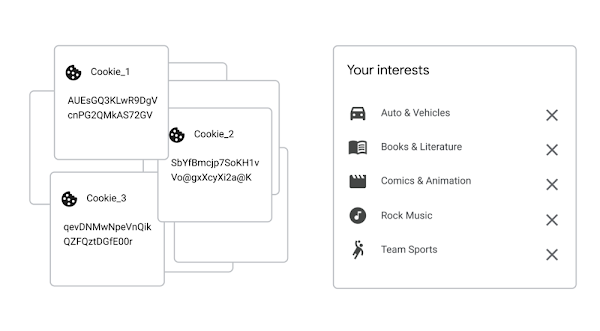


The new Topics API aggregates users' browsing history for a given week into a top pre-designated interests (i.e., topics), which are then retained on the device for a revolving period of three weeks.

Then, when a user visits any participating website, the mechanism will select three of the interests: a topic from each of the past three weeks to share with the website and its ads partners. As a control measure, users can view topics and also remove the topics altogether.

The Topics proposal, including the design features meant to preserve privacy, are available as an overview on privacysandbox.com or you can view the full technical explainer on GitHub. Google promises to launch a developer trial of Topics in Chrome soon that will enable developers and the ads community to try it out.

Albeit, the final design of the user controls and the other technical aspects of Topics will be decided based on feedback and what the trial results.

Topics API: Google's proposal to Replace Tracking Cookies

Microsoft has launched what it calls Speller100, which is a large-scale multilingual spelling correction models for Bing Search worldwide with high precision and high recall rate in over 100 languages.

According to Microsoft, Bing records about 15% of queries submitted by customers having misspellings, and when queries are misspelled, the search engine normally matches the wrong set of documents and trigger incorrect answers, which can produce a sub-optimal results page for web searchers.

Therefore, Speller100 serves to correct this search anomaly so that there will be better misspell handling in more languages from around the world with the help of AI at Scale.

How Speller100 will improve searches in more than 100 languages in Bing?


Microsoft's large-scale multilingual spelling correction models has high recall in over 100 languages with high precision, and these models, called Speller100, are meant to help in improving search results in Bing.


It's a huge step forward for search generally, especially as considering that spelling correction has only been available for a few dozen languages. The Speller100 model leverages on advances in AI, particularly zero-shot learning coupled with carefully designed large-scale pretrained tasks, and historical linguistics theories.

Speller100 is based on the concept of language families, with languages similarities that multiple languages share, and the so-called zero-shot learning, which allows a model to accurately learn and correct spelling without additional language-specific labeled training data.

The models are trained with tasks like MLM (Masked Language Model), next-sentence prediction, and translation. Although, these are commonly used WordPiece or SentencePiece subword segmentation algorithms that break down words into smaller constituents, existing pretraining tasks will operate at the word, phrase, or sentence level for semantic understanding.

How this major AI Leap will help Bing do better search?


Speller100 is perhaps the most comprehensive spelling correction system so far, in terms of the number of languages covered and overall accuracy. And given the improved technology, the search results for all Bing users will become more accurate by expanding accurate spelling correction in over 100 languages.

In fact, analysts have postulated a double-digit improvement in both search spelling correction precision and recall rate, with comprehensive Bing online search A/B testing as follows: the number of times users clicked on item on the search page went from single digits to 70% and 30% reduction in overall number of pages with no results.

Bing Speller100: Zero-shot Search Spelling Correction at Scale

Google’s Android search preference menu auction has been released, and DuckDuckGo was eliminated in most countries, which development did not augur well with the privacy search engine.

The move which is perceived as furthering of Google’s dominance in mobile search by boxing out alternative search engines, has been vehemently fought by DuckDuckGo, as most consumers want alternatives, and search engines like Google take most of their profits from the preference menu.

DuckDuckGo did not just call out Google for unfairly removing it from the Choice Screen Options Menu, but has also petitioned the European Commission (EC) to take action against Google.

What is Android search preference menu auction?


Google’s search preference menu for Android devices in the European Union is based on a recurring auction model, whereby Google offers alternative search engines the chance to bid for three spots in each EU country, with all the proceeds going to Google alone.


While DuckDuckGo won a spot in the first auction, and Android users in Europe had the opportunity to pick DuckDuckGo as their default search engine. However, it’s unlikely that they will remain an option in next year's auctions, as those search engines that squeeze money out of people's personal information, including ISPs will participate in next year's auctions, which will easily outbid search engines like DuckDuckGo that respect people's privacy.

This auction process, proposed by Google, was conceived to make Google more money, not just to provide meaningful consumer choice, according to DuckDuckGo.

What are the Solutions to the Search Preference Menu Auction issue


DuckDuckGo is proposing that auction should be halted, as history has already shown that it simply isn’t necessary. As recently, a search preference menu shifted Android market share in Russia without an auction.

Additionally, Microsoft created a successful browser preference menu in 2010 without an auction. In which case, the top five browsers by market share appeared in random order, followed by a second, randomly ordered tier and most importantly, no browser paid for a placement.

DuckDuckGo could be removed from Android Search Preference Menu


The embattled Chinese technology giant, Huawei as a result of the US ban, had earlier embarked on building own operating system, Harmony OS (Hongmeng OS in Chinese) as Android alternative.

Also, the company is working on its own bundle of alternative services to Google Mobile Services (GMS), know as Huawei Mobile Services (HMS), which comprises of AppGallery, the Play Store alternative, and several other services. Now, the tech gaint is reported to be testing a dedicated search app that will replace Google app on all its devices.

The company invested a whopping $3 billion to HMS development in order to free itself from Google's clutches.

The Hint on development of Huawei Search app


The hint on Huawei's development of search app was by Redditor /u/beingnull who disclosed that the company is recruiting users in UAE for the testing of new search app.


Unlike Google App which comprises Google search, Assistant, Lens, Google Podcasts, and many other services, the Huawei Search app is a basic search application that only allow users to input a search query for webpages, videos, news articles, or images results. Albeit, there is a weather feature, which brings up a widget of 24-hour forecast powered by the Huafeng-AccuWeather, a joint venture of the China Meteorological Service.

Additionally, there are shortcuts for sports, conversion, and calculator, while users can view their search history or toggle it off for privacy, and also give feedback, change their region and language, and toggle safe search, or change the app’s search scope, which controls what the Search app can search.

What powers the Huawei Search App?


The search app service is operated by Aspiegel, Huawei’s subsidiary company based in Ireland, with several of Huawei's mobile software services handled by Aspiegel since 2019.

According to the Huawei Search User Agreement, users “must have a Huawei ID” to use the search service and the service is “only available on Huawei Devices as an app or embedded search file in Huawei services, such as Assistant (i.e. Search is not publicly available on the web).”

The Huawei Search App also support EMIU 10 dark theme and seems to be a pretty decent search app, but certainly not advanced enough to replace Google app for now.

Is Huawei prepping A Search App to replace Google App?


Microsoft Search is a unified enterprise search solution that offers contextual work-related information by sourcing data from Office 365, including: OneDrive for Business, SharePoint, and Exchange. It tends to deliver personalized results which are powered by Microsoft Graph to make search within the organization more effective, and save everyone time.

While the idea is novel, Microsoft's attempt to change the default search engine of Chrome browser to Bing on PCs running Office 365 ProPlus without users consent has been hugely criticized. Albeit, Microsoft's scheme to switch Bing as default browser from Office 365 ProPlus customers' PCs, was perhaps part of Microsoft's Search strategy.

Microsoft Search has become a key component of Microsoft 365, the enterprise subscription bundle for Office 365, which includes Windows 10 and management tools, allowing employees to search for colleagues by simply typing the team name, title, or even office location in the address bar.


Microsoft sought to spread the use of its new search service by enforcing it on enterprise users, those running Office 365, with Chrome as their default browser, even though it knows that the plot could result to serious backlash and possibly, to users rising against the service.

Why the Angst for Microsoft's decision to change the default search engine?


The force-changing of settings on a user's PC for arbitrary reasons, definitely falls under 'unlawful' browser hijacking, which Google has spent significant time blocking hijackers from taking over its browser, and even barring unofficial extensions in the Chrome Web Store from installing, as part of a process to lock down the browser.

Microsoft's attempt to do just what Google has tried to stop is perhaps equating to the unsolicited search engine change practiced by malware makers and scammers.

Microsoft's own policies forbids Browser hijacking


Microsoft's browser extension policy for the old-school Edge states that "All extensions for Microsoft Edge must be deployed from the Microsoft Store," and "The installation must be initiated and completed by the user, using only the user experience provided by Microsoft Edge and the Microsoft Store".

The company's definition of unwanted software includes phrasing that may match how it distributes the Chrome extension. In the support documentation, "How Microsoft identifies malware and potentially unwanted applications," under "Unwanted software," Microsoft said, "Software should obtain your consent before installing." But Microsoft said nothing so far about users consent when it rolled out the update to Office 365 ProPlus.

Microsoft Search for Office 365 ProPlus defaulting to Bing on Chrome browser


Google has made it possible for web searchers to find specific or "key moments" from videos in search results, which feature will come handy for those looking for a particular scene in long videos.

While there are lots of way to discover visual and even audio information on Google, which ranges from finding the useful podcasts that explains the elements in the images, but searching inside a video was not possible before now. With this new capability, Google will make all videos somewhat skimmable like text, meaning it will be easy to overlook video content altogether.

However, video creators will have to provide timestamps in their videos to make them easy for a searcher to run a quick scan of the video content, without necessarily going through the whole of the video.

Steps to highlight Key Moments in Videos on Google Search


If you search for instance, "how-to videos with multiple steps", or perhaps longer videos like a documentary, Google will also provide links to some key moments within the video based on the timestamps provided by the video creators.

So, you’ll be able to easily sift through the content to see find the particular video that has what you’re searching for, and the specific section of the video. And this will especially benefit those people who make use of screen readers, as it will make videos more easily accessible.

What Languages & Video format are supported?


For now, you can only be able to find the key moments for YouTube videos on Google Search in English. And the video creators are required to provide timestamp data in the video description for the feature to work.

Tip: VideoProc is available for Windows and Mac to convert any video to any format.

Google will also introduce a way for other video creators across the web to markup their videos so that they can be more easily searchable on the search engine.

And soon, you’ll will be able to find any key moments from all videos from around the world, including CBS Sports and NDTV, as they've already started implementing the markup code to their videos, with more creators still looking to adopt this helpful feature, and perhaps it will be available in more languages in the near future.

How to Find highlight of Key Moments in Videos on Google Search


DuckDuckGo (DDG) is a search engine, but unlike Google, it strongly emphasizes on protecting the privacy of its users by avoiding the filter bubble of personalized results, and subsequently, targeted advertising.

While Google is notorious for profiling and tracking users behavior online, DDG distinguishes itself by not profiling its users and sticking to the same search results for every given keyword search, and most probably returning the best accurate results, rather than results generated from individual preferences.

The source code is open sourced and hosted at GitHub under the Apache 2.0 License, though the core is proprietary. It sources its results from over 400 sources, including Yahoo! Search BOSS, Bing, and its own Web crawler (the DuckDuckBot); also uses data from crowd-sourced sites, including Wikipedia, to populate "Zero-click Info" boxes, usually above the results that display topic summaries and related topics.

DuckDuckGo has been growing steadily since launched in 2008, and has taken outside investment to scale its efforts to capitalize on growing international reach for its pro-privacy products, which Google has recently recognized the importance of offering consumers a private search option, by adding DuckDuckGo in the Chrome 73 available search engines for over 59 countries.

Google had quietly updated the lists of default search engines available per region on Chrome browser, while expanding the choice of search product users can select from the different markets around the world.

Again, the area of privacy is the big feature that DuckDuckGo sells itself on: As it doesn't log what you're searching for, and will only put up occasional advertising, which isn't personalized at all, and you can easily disable it.

What's more, even the sites you visited know nothing about the search terms you used to find them, and that's something other search engines do, while piecing together different clues from your browsing behavior and the data that your computer broadcasts publicly to sell their ads.

Additionally, DuckDuckGo runs the encrypted versions of a site by default. If you're among those of us who are tired of the big tech companies hoovering up data on us, DuckDuckGo will surely appeal to you.

DuckDuckGo: Get to know the fast rising Privacy-focused Search Engine


Microsoft AI is now powering almost all of its search algorithms, with Bing App camera feature now able to find a celebrity or someone that looks just like you using your selfie.

The feat is perhaps a replica of the feature in the Google Arts & Culture app for iOS and Android, which though not available in most locations because of some privacy laws, allows you to take in-app selfie which it matches to old art museum portraits from its database.

While the Bing app uses the selfie picture to find a celebrity lookalike, in most cases it does turn up your exact image featured in some popular platforms like social media or Wikipedia pages.

The feature uses the visual search technology in Bing, and also employs Bing Entity Search capability which enables developers to embed Bing search results in any application bringing with it rich context about people, places and local businesses to any app or website.

Microsoft research in AI date back to over two decades, albeit it was restricted to internal deployment, but now the company is bringing it to everyone through simple and useful tools.

The feature is rather a useful tool if you wish to find your doppelganger, that is, if you believe in the fictional look-alike or double of a living person, sometimes portrayed as a ghostly or paranormal phenomenon in some folklore.

Bing App lets you take a Selfie to find someone that looks just like you