Showing posts with label Operating Systems. Show all posts
Kali Linux team emphasizes on a major visual changes to their 20xx.1 release, that is the first release of every year. And Kali Linux 2022.1 release brings in new visual refresh and a new flavor known as offline ISO.

There are several other improvements with Linux Kernel upgrade, some new hacking tools, live VM support, Apple M1 support, and more. Let us look at the major highlights for Kali Linux 2022.1.

What's new in Kali Linux 2022.1 Release?


Kali Linux features like drag ‘n’ drop, copy/paste have now been enabled by default to give users a better experience in a VM with i3.


And the new flavor, that comes as a standalone offline ISO includes everything from “kali-linux-everything” packages, offering you the ability to download an offline ISO without needing the packages installation separately.

Kali Linux 2022.1 brings new tools with some worthy of them highlighted below:

  • New packages for ARM64 architecture including feroxbuster
  • Enable legacy algorithms, ciphers, SSH using a setting in kali-tweaks
  • Accessibility improvements for speech synthesis in the Kali Linux
  • Introduction of some new tools like email2phonenumber, dnsx, naabu, and proxify


Also, there are tweaks to remove the exit code, skull icon, and number of background processes, with significant improvements for desktop and Raspberry Pi.

How to Download and Install Kali Linux 2022.1 Release?


For existing users of Kali Linux, a quick update can be performed using the following commands:
echo "deb http://http.kali.org/kali kali-rolling main non-free contrib" | sudo tee /etc/apt/sources.list sudo apt update && sudo apt -y full-upgrade cp -rbi /etc/skel/. ~ [ -f /var/run/reboot-required ] && sudo reboot -f


And for new users, its ISO is available in the official site for download, but note that ‘Everything’ flavor is available only via Torrents.
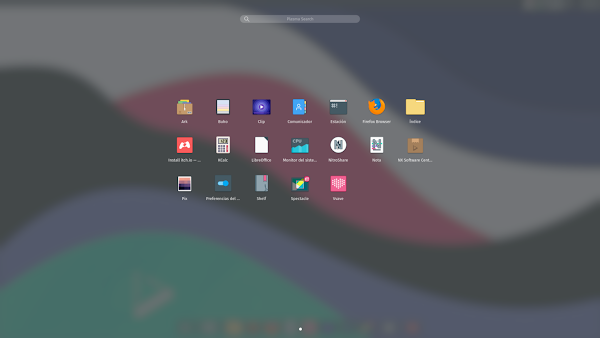
Kali Linux 2022.1 Release: New Everything Offline ISO

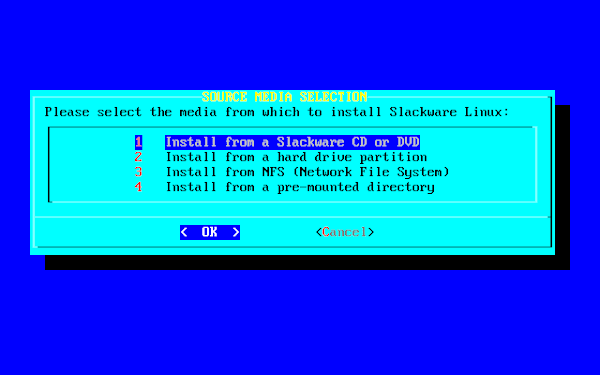
Slackware, one of the oldest Linux distribution, has received a new update after several years, with the latest version having been released in 2016.

The Slackware team starting with an alpha release, went on to release candidates (Two), and finally Slackware Linux 15.0 is now available for the public. Slackware 15.0 has undergone a lot of changes, such as the addition of the latest Linux Kernel 5.15 LTS and KDE Plasma 5.23, which brings enhanced NTFS driver and Apple’s M1 chip support, among others.

Indeed, Slackware 15.0 is an exciting release, as it also offers support for Intel 12th gen processors. Let’s dive into what’s new in Slackware 15.0.

What’s New in Slackware 15.0 Release?


Slackware 15.0 has the major addition of the latest Linux Kernel 5.15 LTS, which guarantees a great hardware compatibility experience for what's perhaps the oldest running Linux distro.


The KDE Plasma packages has been updated to 5.23, with KDE Frameworks updated to version 5.88; and KDE Plasma 5.23 included several UI improvements, and a range of cosmetic changes that improves the user experience. Also, the updated Xfce 4.16 comes bundled with Slackware 15.0, among the desktop environment options.

Highlighted below are other important additions:

  • From Qt4 to Qt5
  • Support for Wayland
  • Improvements in the Slackware pkgtools
  • Includes a “make_world.sh” script for rebuilding the OS from source code
  • SMP and non-SMP kernels for single-core and multi-core processors
  • Support for Privileged Access Management (PAM)
  • Support for UEFI and old systems
  • GCC compiler upgraded to version 11.2.0
  • Support for PipeWire


Furthermore, all the essential packages like Krita, Network Manager, OpenSSH, and Ocular also got an upgrade. With important apps like Firefox, Falkon browser and Thunderbird updated to their latest available releases as well.

How to Download and Install Slackware 15.0?


Kindly note that upgrading from older versions such as Slackware 14.2 isn't feasible, it is advised that you do a fresh installation.

And for a fresh installation, you should checkout the upgrade instructions available here, and you can install the new ISO from the official website.

Slackware 15.0 Release: What’s New?

Nitrux team has released a new version of the Ubuntu-based Linux distribution, Nitrux 2.0.0, with the latest software updates, bug fixes, and performance improvements.

In hardware support, Nitrux 2.0.0, includes a package to support firmware for AMD GPUs, which is unavailable in the kernel packages, with XanMod Kernel as its default along with various other technical improvements. XanMod Kernel is tailored for the best possible desktop experience.

And there are also several visual changes to the layouts and top panel, with updated applications, and desktop environment. The major changes are highlighted below.

What's New in Nitrux 2.0.0 Release?


Nitrux 2.0.0 has XanMod Kernel as the default, and compared to Linux Kernel, you'll find some really big difference in custom settings and new features enabled to enhance your experience.


However, you still have the choice to select the latest mainline LTS or non-LTS Linux Kernel (5.15.17, 5.16.3), as well other alternatives like Liquorix and Libre kernels. Here are the major changes in Nitrux 2.0.0 Release:

  • Pacstall version 1.7.1
  • MESA 21.3.5 by default
  • Added the i915, Nouveau, and AMDGPU drivers
  • Updated OpenRC configuration to allow TTYs to function in the distribution properly and reduced the default TTYs to two (TTY2 and TTY3)
  • Added a package to include firmware for AMD GPUs unavailable in the kernel packages
  • Included the Intel and AMD microcode as early boot code in the ISO for required systems
  • Updated the Latte layouts and added nx-floating-panel-dark
  • LibreOffice to version 7.5.2


Also, there’s a top panel and a dock, but the application menu has been moved to the dock, with the task manager in the middle, and a trash shortcut as next to the session controls.

How to Download or Upgrade to Nitrux 2.0.0 Release?


Nitrux 2.0.0 is now available for download, through the official website, if you're a new user who want to give it a spin. And for existing users, they can easily upgrade to Nitrux 2.0.0 from the previous version.

However, it is necessary to create a Bootable USB after downloading the file, and boot from your USB device. And note that the new ISO uses the LZ4 lossless data compression algorithm for faster installation.

Nitrux 2.0.0 Release: What's New?

The much awaited Linux Mint 20.3 “Una” has finally been released and now available for download, with some impressive improvements, including bug fixes.

While Linux Mint 20.3 comes bundled with the latest Cinnamon 5.2, but the changes remain the same for Xfce and MATE editions, with the exception of the desktop environment-specific enhancements.

There are several other key improvements and additions, many of which will be looked at below.

What's New in Linux Mint 20.3 “Una” Release?


Linux Mint 20.3 is based on Ubuntu 20.04.3 and features Linux Kernel 5.4 LTS, which means all the capabilities and upgrades are available in this latest release.


Besides the core upgrades, there are also astethics changes, as the new wallpapers added to Linux Mint 20.3 will not disappoint you. The theme equally has been revamped with the accent color greatly improved, along with rounded corners for the windows, making up for a more modern look and appeal.

Albeit, the legacy theme package is still available for those who want the same look while keeping other benefits intact.

And the hinted surprise app, “Thingy” App is essentially a “Library” which serves as a document manager for Linux Mint by default, allowing users to download eBooks and other related files, with the app able to automatically detect it from the Downloads directory.

How to Download or Upgrade to Linux Mint 20.3?


Linux Mint 20.3 is now available for download as ISO images from the official website.

As the form of an ISO image (an .iso file) means it can be used to make a bootable DVD or a bootable USB stick. Checkout the guide here to help you download the right ISO image, create your bootable media and install Linux Mint on your computer.

Linux Mint 20.3 “Una” Release: What's New?

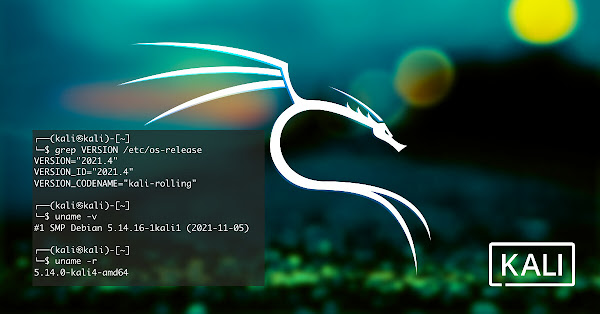
Offensive Security has released the fourth point version of Kali Linux 2021 series, Kali Linux 2021.4, with a number of exciting new penetration testing tools and several improvements.

Kali Linux 2021.4 brings a number of improvements, such as improved Samba compatibility, enhanced Apple M1 support, ability to switch package manager mirrors, Kaboxer theming, coupled with updates to Xfce, GNOME and KDE desktop environments.

It also support the VMware Fusion Public Tech Preview thanks to having kernel 5.14 with the modules needed for the virtual GPU.

What's New In Kali Linux 2021.4 release?


Kali Linux 2021.4 has the Samba client configured for Wide Compatibility so that it can easily connect to any Samba server, regardless of the version of the protocol in use. It should make it easier to discover vulnerable Samba servers, without having to configure Kali.


With the latest update of Kaboxer tools, Kali Linux 2021.4 brings support for window themes and icon themes, allowing the program to properly integrate with the rest of the desktop without the usage of ugly fallback themes. Below is a quick run down of what’s been added to Kali Linux 2021.4:

  • Dufflebag - Search exposed EBS volumes for secrets
  • Maryam - Open-source Intelligence (OSINT) Framework
  • Name-That-Hash - Do not know what type of hash it is? Name That Hash will name that hash type!
  • Proxmark3 - if you are into Proxmark3 and RFID
  • Reverse Proxy Grapher - graphviz graph illustrating your reverse proxy flow
  • S3Scanner - Scan for open S3 buckets and dump the contents
  • Spraykatz - Credentials gathering tool automating remote procdump and parse of lsass process
  • truffleHog - Searches through git repositories for high entropy strings and secrets, digging deep into commit history
  • Web of trust grapher (wotmate) - reimplement the defunct PGP pathfinder without needing anything other than your own keyring


Additionally, the NetHunter app now includes The Social-Engineer Toolkit, which can be used to customize Facebook, Messenger, or Twitter direct message for social engineering attacks.

How to Upgrade to Kali Linux 2021.4 Release?


For existing users who are using the previous version of Kali Linux, they can simply run the following command to upgrade their system to the latest Kali Linux 2021.4:

sudo apt update && sudo apt -y full-upgrade


And for a fresh installation from scratch, you can download the ISO image from the official page for the different supported versions and systems.

Kali Linux 2021.4 Release: Improved Samba Compatibility

The Zorin team has announced the release of Zorin OS 16 Lite, which condenses the Zorin OS 16 experience into a streamlined distro, designed to run efficiently on low-spec computers.

While Zorin OS 16 is one of the most advanced and popular release based on Ubuntu 20.04.3 LTS, offering a “Pro” edition which replaces the “Ultimate” edition that comes preloaded with a few apps and a couple of layouts. With the base edition, Zorin OS 16 “Core” still free, including all the essential features.

Now, Zorin OS 16 lite edition is powered by Xfce desktop environment for efficient performance with limited resources.

What’s New in Zorin OS 16 Lite Edition?


Zorin OS 16 Lite offers a refreshed with a revamped and refined appearance out of the box, with touches and animations that delightfully elevates your computing experience.


First, the taskbar is entirely new and re-written from the ground up to integrate well into the older desktop, now, it shows window previews when hovering over an app icon, allowing you a better overview of your workflow. It also includes the new Zorin Appearance from Zorin OS 16, designed to be even easier for use and navigation.

Zorin Appearance allows users to select a different desktop layout, and able to change the app and icon theme, with desktop font, and tweaking of other parts of the desktop to make experience truly personal.

Additionally, the Software store in Zorin OS 16 Lite comes pre-loaded with the app catalog of Flathub with the Snap store, and the Ubuntu APT repositories. And the built-in Software store also got many under-the-hood optimizations as well as UI improvements to make it easier to find and install apps from the different sources.

Furthermore, there is a new Sound Recorder app that provides a simple and beautiful way to record audio and speech and play it back. If perhaps, you’re creating a voice memo or producing a podcast, the Sound Recorder app will adapt to your workflow and makes the recording of the audio simply effortless.

How to Download Zorin OS 16 Lite?


Zorin OS 16 Lite and the Pro Lite are now available for download from the company's official website.

If you’ve already purchased the Zorin OS 16 Pro, you can download your copy of Zorin OS 16 Pro Lite from the download link in your purchase email.

Zorin OS 16 Lite Edition: What’s New?

The Mint team has unveiled some updates about the new features in the upcoming release, Linux Mint 20.3, which release is just around the corner.

While the major upgrades in Linux Mint 20.3 includes the addition of MATE 1.26, against the previous Mint 20.2 release, which had MATE 1.24. Besides the updated version of MATE, it also brings a dark mode for XApps, and a brand-new mysterious app.

In fact, there are several key improvements and additions, many of which will be looked at here.

What New Features are Expected in Linux Mint 20.3 Release?


The most notable change is perhaps the addition of a dark mode for XApps, which change will affect all flavors of Linux Mint.


In the XApps also, the PDF reader gets proper manga support, by just hitting the left arrow key in manga mode, you are taken forward in the document, and the image viewer has received the ability to quickly fit into the width or the height of the displayed picture. And Cinnamon 5.2 brings multi-calendar events and events created in your calendars appears in your calendar applet. The applet also syncs with evolution-data-server, which enables it to support many other online calendars and apps.

Additionally, there is a mysterious app hinted at the Linux Mint blog, called ‘Thingy‘, which is currently on the Mint team’s GitHub account, and may serves as a document organizer app for Linux Mint. Albeit, there are still sketchy facts about the details and not much is known as at yet.

What's the Release Date of Linux Mint 20.3?


The first public beta of Linux Mint 20.3 will be released on December 18. It will perhaps unravel more of the features and changes to expect in the final release.

And the final release of Linux Mint 20.3 is still uncertain to come through this year, as the holiday season is fast approaching, however, ardent users will certainly welcome the gift of Mint 20.3 this Christmas.

Linux Mint 20.3: What's Expected Features and the Release Date?

The MX Linux team recently released MX Linux 21 based on Debian 11 “Bullseye” and running Linux Kernel 5.10 LTS, coming as the first stable release of the “Wildflower” series.

Now, MX Linux has announced the release of another edition called MX Linux 21 AHS, where the ‘AHS’ stands for ‘Advanced Hardware Support’ meaning it includes newer graphics stack tailored for modern systems.

MX Linux AHS edition comes with the Xfce desktop environment by default, which guarantees smoother experience, as the Xfce desktop environment already has some significant improvements with the main MX Linux 21 release.

What’s New in MX Linux 21 AHS Edition?


MX Linux 21 AHS comes with Linux Kernel 5.14 and updated open-source graphics stack tailored for modern system.


It includes updated mesa, xorg and vulkan drivers for a graphic stack more inline with newer hardware, also with a few recompiled apps that utilize the later kernel. And MX Linux AHS will receive updates for the graphics stack over time, therefore those that do not need the newer graphics stack, don't have to use AHS.

Additionally, all users of the mainline MX releases can enable the ahs repository through mx-repo-manager to do regular updates, while keeping your 5.10 kernel, albeit you’ll have to get the later mesa, xorg and vulkan drivers.

How to Download and Install MX-21 “AHS” Edition?

.

MX Linux 21 AHS iso is now available for download, either as a direct download or you can choose to get the torrent files.

But note that there is a known issue for older systems, particularly with intel-based graphics, with suspend-to-ram, or at least resuming after suspend. If that feature is important to you and your PC can otherwise use the 5.10 kernel from the main releases, then stick with the main releases.

MX Linux 21 AHS Edition: What’s the Difference?