Showing posts with label Open Web. Show all posts
Similar to Y2K bug, also called Millennium Bug, there is a problem in the coding of computerized systems that's projected to create havoc in computers and server networks around the world in the year 2038.

As computers are programmed to store the last two digits of the year only because it saves storage space, there’s only one day left in the year 1999 (99); which is a day later, therefore the systems would supposedly fail to understand if it’s the Year 2000 (00) or 1900 (00), so was the argument.

While the storage of a combination of date and time within a fixed binary field is often considered the solution, albeit the possibility for software to misinterpret dates still remains as date and time representations are relative to some known origin.

What's the Year 2038 Bug?


The Year 2038 bug is as a result of the original Unix time datatype (time_t) which stores a date and time as a signed long integer on 32-bit systems a 32-bit integer, representing the number of seconds since January 1, 1970. After 2038, this number will exceed 231 − 1, the largest representable by a signed long integer on 32-bit systems.


It will cause the Year 2038 bug, also referred to as the Unix Millennium bug, which unlike 64-bit systems which uses 64 bits, the problem doesn't exist on 64-bit systems as they use the LP64 model.

And the maximum value of a 32-bit interger, which is 2,147,483,647 will starting from 19th January 2038, at exactly 3:14:07, result to the value of stored time since January 1, 1970 to equal the value of a 32-bit integer, that is, 2,147,483,647, thereby causing the issue.

How Linux Kernel 5.10 Solves the Year 2038 Bug


The XFS file system in Linux Kernel 5.10 has been extended to the year 2486, which change fixes the Year 2038 bug. With “Large Timestamps” function that has now fixed this problem by refactoring their timestamp and inode encoding; and the timestamps will now be dealt with as a 64-bit nanosecond counter and bit shifting to extend the measurement.

It is made possible by a brand new XFS file-system with bigtime enabled, which permits the timestamp from December 1901 to July 2486, and for the preservation of backward compatibility, the large timestamps function isn't enabled by default.

Thus, XFS also takes care of the year 2038 problem, whereby the storing of the time since 1970 in seconds will now not slot in a signed 32-bit integer and a wraparound till the year 2486.

Linux Kernel 5.10 Solves Year 2038 Bug with new XFS file system

Flutter is a cross-platform toolkit designed to allow code reuse across operating systems, such as iOS and Android, allowing applications to interface directly with the underlying platforms.

While the Flutter SDK has been broaden to include other platforms including web, macOS, and Linux; now, the alpha release of Flutter for Windows has been announced. As Windows remains a popular desktop choice, with over one billion active devices running Windows 10, it’s a natural target for Flutter.

Flutter for Windows Alpha can build standard .exe files and the supporting libraries, to run on PCs as dated as Windows 7, all the way up to Windows 10. And just like Flutter on other platforms, you can make use of the exact Dart code for Android/iOS app for Windows and other supported desktop platforms.

What the Flutter SDK will bring to the Windows platform


Flutter expands the core framework of each platform it is added on with new services to enable it to shine on that platform.


Furthermore, the new platform doesn’t only influence the Flutter framework and engine, but several other things as well, including:

  • Plugins: Mixture of Dart code and native code available for each of the platforms which the plugin supports. And the native code has to be added for each plugin compiled into Flutter app.
  • Toolchain updates: It adds a new target to the CLI and IDE tools, which in this case, on Windows platform.
  • Shell: The support for handling input from Windows via WM_* messages and output via ANGLE, uses Skia to render at native speed for underlying DirectX surface.


Additionally, every new project gets a shell application for the supported targets, like on Windows, there is a Win32/C++ program that loads Flutter code and executes it at runtime, which is a good place to add native code to your app if needed.

How to Get Started with Flutter for Windows


The Flutter SDK can be installed according to the Windows installation instructions, here. And you need to target Windows desktop, which you first need to install the tooling described in the desktop docs. Flutter by default assumes that you’re building production software and it isn’t configured to develop Windows apps. But, the following command line, fixes it:

$ flutter channel dev
$ flutter upgrade
$ flutter config --enable-windows-desktop


And note that every time you create a new Flutter app, using the extension support for Android Studio or Visual Studio Code, or from the command line, it creates a new windows subfolder.

Flutter for Windows: Google’s Popular SDK comes to the Windows platform

Windows-linux


Microsoft at the Build 2020 virtual conference, announced some new improvements coming to its Windows Subsystem for Linux 2 (WSL2), which includes support for the Linux Graphical User Interface (GUI) Apps on the Windows platform.

While Windows users can currently access Linux system on WSL2 through a command line, but of course, it does not come easy for some users. So, Microsoft's recent introduction of full Linux file integration to the File Explorer app was to ease things up.

And now, Microsoft has gone ahead to bring Linux Graphical User Interface (GUI) apps to WSL2 together with Windows 10 apps. Along with support for Linux app, Microsoft will also be bringing GPU hardware acceleration for Linux apps running on WSL2, with the first draft of the brand new Microsoft Virtual GPU (vGPU) driver already started.

How Linux GUI Apps Can Run Alongside Windows Apps


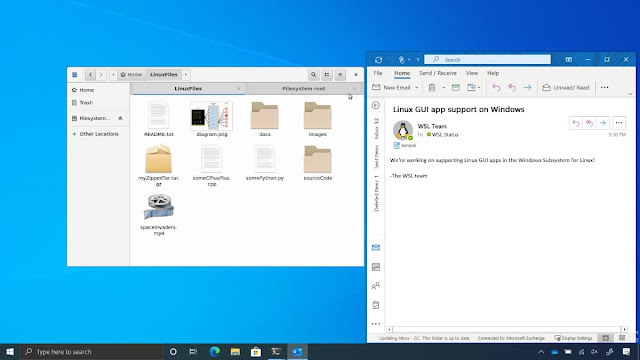
Microsoft had demonstrated samples of Linux GUI-based apps running directly via WSL and opening a WSL instance, doesn’t require any third-party X server to run Linux GUI app.

Linux GUI Apps


Before now, you could only run Linux GUI apps within Windows 10 using a third-party X server, though it resulted poor graphics performance as the technical configuration didn’t integrate properly with the Linux system.

The latest WSL2 update, brings Linux GUI apps integration with Windows 10 using Wayland display server protocol that runs within WSL; it communicates with an RDP (Remote Desktop Protocol) client on the Windows host in order to run the GUI app.

What's Microsoft Virtual GPU (vGPU) driver for Linux kernel?


Microsoft Virtual GPU (vGPU) driver exposes a paravirtualized GPU to applications running in a virtual machine on a Windows host. It enables hardware acceleration in environment such as WSL (Windows Subsystem for Linux) whereby the Linux virtual machine is able to share the GPU with the host.

And it accomplishes this by exposing the WDDM (Windows Display Driver Model) interface as a set of IOCTL, which allows APIs and user mode driver (written against the WDDM GPU abstraction on Windows) to be ported to run within a Linux environment.

This, in turn, enables the port of the D3D12 and DirectML APIs and their associated user mode driver to run on Linux. Also, it enables third party APIs, such as the popular NVIDIA Cuda compute API, as hardware accelerator within a WSL environment.

Finally, support for GPU hardware acceleration will arrive for Insiders in the Fast Ring for initial testing with the upcoming Windows 10 2004 update. And subsequently, Linux GUI apps support will come later this year via Windows 10 updates.

Linux Graphical User Interface (GUI) Apps coming to Windows 10 via WSL2


Sandboxie is one of the most popular Windows-based sandbox isolation tool, which was acquired by Sophos in 2017 and later converted to free-to-use software, now the company has released the source code to the public.

While Sandboxie is a perfect example of how to integrate isolation tool with Windows at a very low level, and capable of running any Windows app that requires a secure virtual sandbox to run; the programs run in isolated space to prevent them from making permanent changes to other programs or modifying the data on your computer.

Also, the programs in Sandboxie can run as you do normally by visiting websites, downloading files and clicking on links. If in any case you encounter malware attack, you can simply shut down your PC and your system would still remain safe.

The Open Sourcing of Sandboxie


Sophos updated Sandboxie to version V5.33.3 for Windows 7, 8.1, and 10, while making available all the features reserved for commercial versions of Sandboxie free in that release, with the source code version 5.40.

The latest version of Sandboxie for Windows 7, 8.1 and 10 has been made available to the community, and no future updates will be made by the company, as all features have now been made completely free in this version. Any further improvements will need to be made through the open source community.

Sophos has scheduled the shut down of the community Sandboxie forum and the license server on June 1st 2020. As the open source release has no code to check for the license server, which was removed in the V5.31.1 release.

How to Compile the Sandboxie Source code?


Firstly, there are 3 steps to follow in building Sandboxie:

  • Compilation of the source code
  • Signing of the generated binaries (Required for the Driver)
  • Creating the installer (Useful for initially performing tasks like installing the driver)


Then, start with the Readme.txt file in the root of the source code, but the main piece that is needed to compile the code is Microsoft Visual Studio 2015.

Albeit, the Community Version may build the source code but there are restrictions on the use of the binaries generated by this version. And there is a dependency on the Microsoft Windows Device Driver Kit 7.1.0, which link has been provided in the Readme.txt file.

For further information on how to compile the source code, you should refer to the Sandboxie official website.

Open Sourcing Sandboxie: What its Dedicated Community stands to gain?


The largest independent open source software company, SUSE made a commitment to help manufacturers of medical devices fighting COVID-19 by offering free services such as maintenance support for its container technologies in the medical devices.

SUSE solutions such as flagship SUSE Linux Enterprise Server (SLES) operating system and container technologies, which can be embedded in the medical devices, will be available immediately to help speed up time to market for the devices.

These programs and the support packages will to help to meet the urgent demand to get medical devices into the hands of users.

What SUSE is Offering Medical Device Manufacturers Fighting COVID-19?


The global pandemic, COVID-19 requires more than simply trying to survive as companies and individuals, So SUSE has determined to help as much as possible by doing what they do best. With cutting-edge open source technology and know-how which is capable of helping in the fight to save lives.

SUSE Linux Enterprise operating system can be built into, and help to run various kinds of devices, and hardware. And SUSE Embedded Linux features optimized system footprint for products, including medical devices.

While the container technologies include SUSE CaaS Platform, which allow companies to use Kubernetes to easily deploy and manage container-based applications and services, and Cloud Application Platform, that brings an advanced native developer experience to Kubernetes so organizations can get their applications on the cloud and to market faster.

SUSE commitments in Fight against COVID-19


SUSE customers cut across the pharmaceutical and research space, along with laboratories all over the world, which are all using supercomputers running on SUSE Linux Enterprise to find the solutions to health issues posed by COVID-19, including prevention, and treatment.

These technologies ensure the security and reliability of the devices they run on or manage, which is critical to arriving at a solution.

As open source is rooted in community, and through collaboration, unwavering compassion, and innovation, the global SUSE communities are stepping up to support all those who are involved in the fight against COVID-19.

SUSE Offers Free Container Technologies to fight COVID-19 Pandemic


Microsoft's embrace of HTML5 signaled the switching of Windows coding standards, which ultimately meant the weaning of developers off traditional Windows tools.

While Silverlight, Microsoft’s rich Internet application plug-in competed with Adobe Flash back in the days, before HTML5 overthrew them both. The support for Silverlight did continue for sometime, as the company made available the F12 HTML tools in Internet Explorer, until generally accepted a fully-featured tool for HTML5 on the platform, the traditional tools remained indispensable.

Albeit, Microsoft still supports Silverlight 5, however it's already slated for discontinuation in October 2021. And Silverlight support has been limited to Internet Explorer 10 and 11.

But, the recent introduction of OpenSilver by .NET software company Userware, will provide an open source re-implementation of the erstwhile Silverlight via the WebAssembly binary format.

How OpenSilver intends to resurrect Silverlight?


OpenSilver serves as a plug-in-free version of Silverlight, using the Mono software platform for WebAssembly and Microsoft Blazor. It fills the gap left by legacy Silverlight, and useful for building new applications or upgrading existing Silverlight apps.

Silverlight can also be recompiled with OpenSilver to run on all browsers supporting WebAssembly, including Chrome, Firefox, Safari, and Microsoft Edge. And it is supported on several operating systems, such as Windows, ChromeOS, iOS and Android platforms.

Though not all Silverlight features are currently supported, developers should therefore expect some compilation errors. But the limitations can be solved through such methods as importing of .NET Standard or JavaScript library.

How to Get started with OpenSilver


If you are a developer and want to build an application using OpenSilver, you can download a free extension for the Visual Studio 2019 IDE, which will install project templates to “New Project” dialog.

And developers using Visual Studio should simply select the Silverlight Universal Windows Platform (UWP) dialects.

Also, the extension can be used to recompile applications, and the current preview covers about 60 per cent of the Silverlight API, with almost all the commonly used features supported. Additional features expected include Open RIA Services and Telerik UI for Silverlight.

OpenSilver Project revives erstwhile Microsoft’s Silverlight via WebAssembly


Intel’s oneAPI project has been unveiled to deliver unified programming model that simplify application development across multi-architectural computing systems.

The oneAPI will help facilitate programming of CPU and accelerator using the modern C++ features which expresses parallelism through new programming language known as Data Parallel C++ (DPC++).

It supports both direct and API programming, delivering a unified language and libraries to offer native code experience across a range of different hardware, like GPUs, CPUs, FPGAs and even AI accelerators.

About Data Parallel C++ (DPC++)


Data Parallel C++ (DPC++) is a new open and direct programming language that is cross-industry compliant, based on C++ and incorporates SYCL.

It's most distinguishing feature is support for open/cross-vendor applications, and been based on SYCL/C++, with Intel offering new analysis/debug tools and optimized libraries for various target domains.


DPC++ will allow developers to code across different hardware like GPUs, CPUs, FPGAs, and other accelerators with just a single source code document.

What One API Initiative means for developers?


The world’s diverse data-centric workloads means that developers have a lot of tasks to scale, as these architectures often require an efficient software programming model to deliver performance, oneAPI will help facilitate programming of CPU and accelerator using the modern C++ features.

It addresses the issue of diverse workloads with ease-of-use and performance based programming model, while also eliminating the need to maintain different code bases, multi-language programming, and diverse workflows.

The oneAPI’s libraries span several domains that benefit from workload acceleration, with library functions that are custom-coded for each of the target architecture.

Intel has promised to deliver enhanced versions of analytics and debug tools for DPC++ and other range of SVMS architectures, with the release of a developer beta and more details on the project within this fourth quarter.

Intel’s Unified Programming Model, oneAPI to cover diverse Architectures


Microsoft's removal of its hold on patents to the exFAT file system, through the Open Invention Network (OIN), has made it available on the Linux kernel for use by the open source community.

The company joined the Open Invention Network (OIN) in late 2018 in a move perceived as its endorsement of open source, which it essentially agreed to grant royalty-free and unrestricted license to its patent portfolio. Microsoft has now also removed its hold on the patents related to the exFAT file system, which Linux users have had to undergo hard times dealing with on their PCs.

The exFAT (Extended File Allocation Table) is a file system released by Microsoft for Windows, which made debut with Windows CE 6.0., and had remained a proprietary software, only available to paid Microsoft subscribers.

Albeit, the exFAT file system is also compatible with macOS, but Linux users had been in pains dealing with exFAT-formatted SD cards and flash drives on their PCs. And in comparison to the erstwhile FAT32 which only support file size of up to 4GB, the exFAT allows nearly unlimited for both partition and file sizes.

Though, there's FUSE-based workarounds implemented to achieve a level of compatibility with Linux, and Samsung haven also published its own Linux driver for the exFAT file system, but still nothing worked better.

Microsoft maintains that this latest addition to the open source patent consortium, is the company’s effort to ease things up for Linux users and in fact, the whole of the open source community.

Additionally, the company has also integrated its software with Linux via Windows Subsystem for Linux (WSL) on Windows 10.

Microsoft's romance with Open Source, brings exFAT File System to Linux