Showing posts with label Featured Posts. Show all posts
Have you ever desired that Live Voice Changer software to change your voice easily on Mac and PC, including Male to Female, Ghostface, Anime, Deep Voice voice changer and more?

Even if you want to Prank your friends with funny voices and some cool sound effects in games, chats and live streaming? iMyFone MagicMic is an amazing voice changer software, which you can customize to your own soundboard. As an excellent soundboard for Mac and PC, MagicMic will help you to create a wonderful online experience with a natural Voice changer for Discord, Fortnite, Zoom and many more.

The voice changer software can also be used for creating videos for various purposes, and there are many use cases, but with so many options, it's hard to choose the right real-time voice changer tool.

Some Unique Features of iMyfone MagicMic


  • Fully supported on Windows 7, 8, 8.1, 10, and 11
  • Change Your Voice with Various Voice Filters in Real-Time
  • Voice Emulator Directly in Games or Other Applications
  • Over 200 Voice Effects to Use on Your Favorite Programs


How to Configure iMyFone MagicMic


First download and install iMyFone MagicMic on PC or Mac, and launch the software, if perhaps this is your first time running MagicMic, there are setup instructions you have to follow.
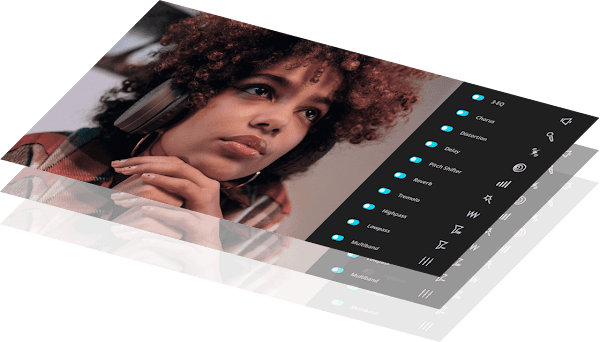


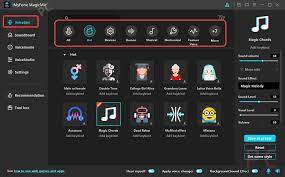
Launch the Voice Changer with different voices available, separated into categories such as Voices for Male, Voices for Female, Background Voices, Fantasy Voices, and many more.
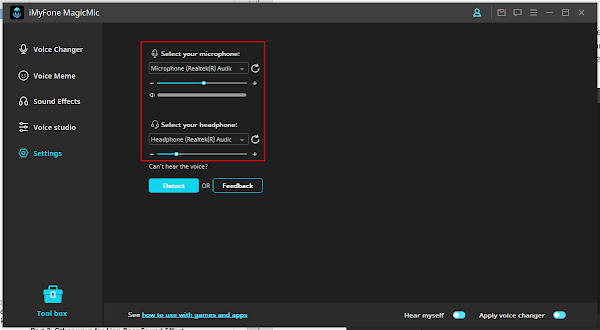


Then you’ll have to choose what output and input method to use as voice changer. The input device should be your microphone and the output device will be your headphones. You can always access this section under the Settings tab if you need to change anything.


Start your desired program. Then go into the Voice Settings menu. Pick “Microphone” (Voice Changer Virtual Audio Device, or WDM) as an input device. Also, the voice can then be changed in real-time in the program that was selected.

Conclusion


As a professional voice changer for both PC and Mac, with Discord to distort your voice to make it unrecognizable, it has both creative, pragmatic and fun reasons.

And finding a reliable voice changer for Discord isn't really an easy task since the internet is full of fake tools, all claiming to be the best.

MagicMic Review: Best Free Voice Changer for Mac and PC

People in the construction industry experience burnout when they work for long hours with heavy work pressure. Anxiety and burnout are the main reasons for burnout. It affects the workers’ health, and many working days are lost due to work-related health issues.

A data collection app makes the job easier and more efficient for people in the construction industry. The real-time data collected includes the number of hours worked, daily reports, the materials used, and safety checklists.

Production tracking is also a significant benefit of using the software. Nearly 92% of construction employees own a smartphone, and the app connects people working on the site and in the office to share data immediately.

Work updates are available to the field officers and the clients in real-time, and it helps save time and improve work efficiency. Plans in the construction industry constantly change due to architectural changes or weather. Generally, people use pen and paper to document the changes.

It takes more time to record the changes, and human errors may occur. Data collection software helps in easy documentation of data on the site, and the entire team gets instant updates on productivity and safety. The software makes data collection easy and accurate and eliminates the possibility of things getting overlooked.

The need for data collection software


Several people like project owners and subcontractors are involved in a single construction project. Clear communication between them is needed to complete the project efficiently.

When communication and documentation are done using pen and paper, data can get lost or misplaced easily. Mobile data capture keeps the data safe and easily accessible by all. There are no delays in communication as the data is visible to everyone involved in the project.

Pen and paper documentation is made manually, and it has an opportunity for mistakes and human errors. Mobile data collection saves time, reduces errors, and eliminates the need for copying information.

The most significant advantage of using the software is it allows people to see how much the project is completed each day. It helps to make better decisions that help to save money.

Benefits of using data collection app


Time tracking


Manual time tracking is a challenging job and is not very efficient, but with the use of software for timesheets, it could be a different story. The workers have to be tracked constantly for entering data into the payroll system.

The data capture app replaces the pen and paper system by allowing workers to log in and out from their smartphones and sync the time entries directly with payroll. The GPS ensures that the workers enter the time at their respective job sites. The field managers can set alerts and reminders for missing time entries.

Digitize reports


It is tough to share important data with the team members when they are documented using pen and paper. The software eliminates the use of pen and paper and saves time. It instantly captures photos and field data and attaches them to the job information. The data is captured in real-time and shared quickly with others.

Sync data


The data is integrated with back-office systems like payroll and accounting by using the software. It eliminates manual data entry and allows the automatic movement of data from one system to another. Data synchronization saves time and stops businesses from worrying about data entry.

A data collection app is needed to handle the burnout caused by excessive stress in the construction industry. It increases productivity and improves the lives of people working on a project. The app prevents people from losing their energy and interest in the project and focusing better to deliver highly valued results.

Combating burnout in the construction industry

The global supply chains help industries and manufacturers to be more profitable and efficient by decreasing costs and helping businesses to flourish in the international markets.

Therefore, the prime motto of supply chain management is ensuring that the entire international network of vendors, manufacturers, transportation companies, warehouses, retailers, and distributors operate smoothly and efficiently.

Global Supply Chain Management - An Overview


For the past several decades, one of the most prevailing trend is the process of globalization, where several businesses and manufacturers strive to take advantage of the low-cost manufacturing system and abundant raw materials available in developing countries across the world.

Global supply chains – to be very specific, are the network of logistic, manufacturing, communication firms, and transportation that shifts materials and products through the help of worldwide distribution channels and production. The global supply chain management process ensured the security and on-time delivery of anything and everything. It includes primary or raw materials required for production to the final finished products, in their journey from suppliers and manufacturers to the wholesalers, or perhaps the people who work as retailers, etc.

The supply chain managers ensure cost reduction, efficiency improvement, and all sorts of risks.

What is causing global supply chain issues?


There are primarily three major reasons that are causing global supply issues. First, the pandemic has left with a shortage of manpower, and eventually, that has reduced the production capability worldwide.

Distortions to demand due to the change in customer purchasing manner are another reason behind global supply chain issues, and the manufacturing and logistics systems more often run near or at their maximum capacity.

Manufacturing


Nowadays, ports, factories, and trucking capacity have become very expensive. Thus, they are designed in such a way that there is always a scope of high utilization. This means that each of them does not have a huge capacity.

Functioning close to capacity helps manufacturing and distribution cost-effective. But this also means that it does not require much to overwhelm them. This is because it is not taking place at one point but several points on a global supply chain and it becomes difficult to maintain the supply and demand balance

Irregular stress on demand


In the post-COVID era, businesses have seen increased demand, but it is not quite balanced. However, this has made companies scramble to keep up with the demand. This is creating a kind of irregular ripple effect in the supply chain.

Every business anticipates a probable future increase in demand based on the current rise in demand. In a supply chain where every business simultaneously supplies and orders products and services. A slight increase in need at the bottom of the chain creates a ripple effect, creating a considerable demand in the other end of the chain.

What's in store for the future?


One effect of this global supply chain disruption is that customers will find a surplus of earlier items hard to see during the COVID days. This disruption will stay for some time before it stabilizes again.

Businesses recovering from the sloth during the pandemic need to acknowledge this disruption in the supply chain. They need to revisit their disruption mitigation plans and strategies and build more resilience.

Conclusion


Despite all the hardships in supply chain management, opportunities will keep coming. A business more resilient to the distortions will eventually prosper from it. So, a company should not lose heart but keep up with the hard work.

What is causing Global Supply Chain issues?

Data collection apps are applications that are used by businesses to collect data from their consumers, the services they provide, and the quality of the services. Data collection apps are also used to collect data from the environment, from employees, and the customers themselves.

Data Collection Apps are used by companies to collect data from their clients. Data Collection Apps are used to create a database of information from the users which could then be analyzed to make improvements.

Data collection apps are becoming more prominent in today's world. Data collection apps help collect the data for business. There are many different types of data collection app.

There are apps that are used to gather data from surveys and polls, apps that are used to collect information from devices like wearables, apps to collect data from running, swimming, cycling, and many more. Data collection apps can be used to collect data in a variety of fields. They are used in medical, sports, business, and personal fields.

Uses of Data Collection Apps


1. Easier to Collect Data


Data collection apps are also used to collect data from the environment, from employees, and the customers themselves. Data collection apps are used by companies to collect data from their clients. Data collection apps are used to create a database of information from the users which could then be analyzed to make improvements.

2. Easy to Compile Data


Data collection apps are the most efficient way to compile and organize data from one central location. The next time you find yourself in a situation where you need to make a list, whether it be a grocery list, a list of items to take on a trip, or even a list of goals you want to accomplish, you should consider using an app like Google Keep or Evernote.

3. Easy to Share


You can keep notes, make lists, and compile information all in one place, which is easily accessible on any device. These apps make it easy to share information with others, so you can stay organized, even if you are working with others.

How Data Collection Apps are Reducing Paper Work


Data collection apps are the best way to get rid of paperwork. Data collection apps are used to optimize and enhance business processes by gathering data from employees, customers, and vendors. It is a tool that you can use to collect data from various sources, organize, analyze and report back to the users.

It is being used by both small and large-scale enterprises to achieve business goals. Data collection apps are used to collect data from various sources. By accessing the data through the app, you can easily analyze the data and create reports. Here are some of the benefits that you can enjoy by using data collection apps.

There are different types of data collection apps, if you are looking to invest in a data collection app make sure you understand the requirements of your business and invest in the application accordingly. Do your research and choose the one that matches well with the requirements.

How Data Collection Apps Reduces Paperwork?

As kids now spend most of their time online, and therefore, exposed to trolling, bullying and other online vices, concerned parents are always looking out for the best app to monitor their kids' activities on iPhone or Android.

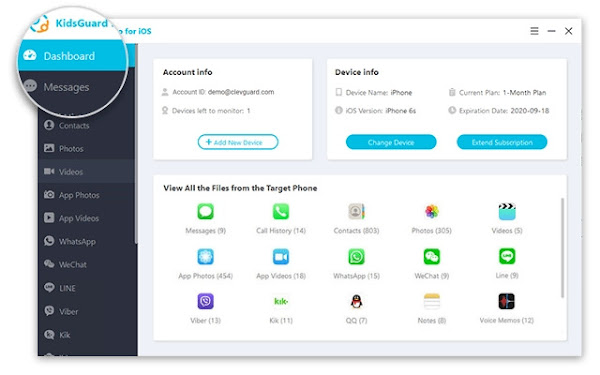
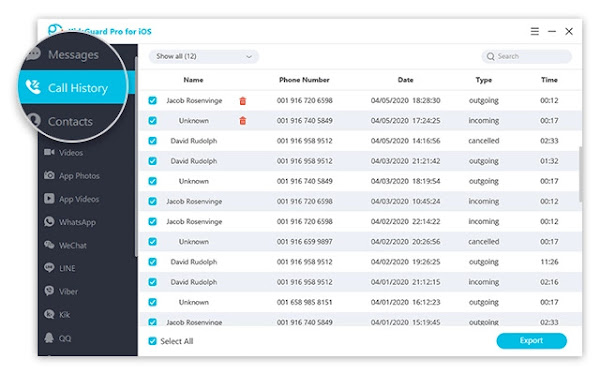
KidsGuard Pro is perhaps the most reliable monitoring software for iPhone and Android devices. The application comprises voice and location packages, capable of recording both the incoming and outgoing calls, as well as text and instant messenger chats.

While Android devices have become hugely popular over other rivals, especially because of its affordability and also, flexibility, most users still want some anonymity with their devices.

It’s no longer news that iOS is now expressly available for the iPhone line of devices. The move drew a parallel line between the iPhone and iPad, with different features for the two hardware to cater for the needs of the user base.

Some Unique Features of KidsGuard Pro for iPhone and Android


  • Sync data over Wi-Fi
  • Requires No Rooting or Jailbreak
  • Supports over 20 files on iPhone
  • 30+ files on the Android version
  • Capable of Monitoring Even Deleted Files
  • Effortless Installation within only 5 minutes
  • Monitor target’s iCloud data, even without iPhone


NB: Rooting your phone makes it vulnerable to malware attacks, therefore, KidsGuard Pro has some advantages as it can monitor without rooting, while most other such apps require you to root or jailbreak your device.

Steps to Setup KidsGuard Pro for iPhone Monitoring


Step 1


Start by registering an account for KidsGuard Pro and purchase a valid subscription plan. Then proceed to download and install KidsGuard Pro iPhone app onto the PC to be used to monitor the iOS device.


Step 2


To scan the target device and get data, there are two options, either, you connect the iPhone to target's frequently used computer with USB cable to back up data or backup the iPhone remotely over Wi-Fi.. So, you have to choose from the two options to commence the scanning.

Step 3


Once the scanning process is completed, you can now switch between different file types to view details. Also, the deleted files can be checked, that is, if you want complete insight on the monitored data, especially for call logs and chat history files.


NB: KidsGuard Pro is a PC-based software and so, can only be used on a PC or Mac for the monitoring. If there is a pop-up that says " Windows protected your PC" when installing the app on your Windows PC, you simply need to click on the " More info " tab underneath the description. And then, select " Run anyway " to continue the installation of the program on the computer.

Our Recommendation!


KidsGuard Pro is without doubt one of the best available monitoring apps for iPhone and Android. It also allows you to check the content added in Calendars, Notes or Reminder apps on the monitored iPhone or Android device. And the best part, it is reasonably priced.

KidsGuard Pro Review: Monitor Your Child’s Activities on iPhone or Android

Many people are employed in small businesses in Vancouver, WA, from accountancy firms and delivery companies to management or engineering industries and stylists. Invariably, the competition is tougher among these businesses to outdo one another in a cut-throat market.

By hiring Vancouver SEO services, local businesses can effectively adjust their online presence and become more visible and accessible to the public. It is among the most cost-effective and prudent marketing strategies to help Vancouver businesses scale new heights with ease.

3 Ways SEO can BENEFIT SMALL BUSINESSES IN VANCOUVER, WA


Here’s a list of some very incredible ways in which hiring a local SEO service provider can change your business for the better.


Attracts Customers Via Organic Search


Vancouver city is highly supportive of small businesses and is continually looking to launch new schemes and programs to help them flourish. Besides help from the city authorities, small business owners in Vancouver can boost their profits and overall performance by having a robust online presence. They can do this by hiring local SEO experts to work on their website and make it more accessible to city residents.

A fantastic advantage of SEO is that it can draw in many local customers to your website because over fifty percent of all web traffic comes from organic searches.

Moreover, many digital marketers can testify that most of the leads come from SEO-engaged website visitors in not just Vancouver but all of the United States.

Enhances Brand Recognition


When you permit reliable and reputed Vancouver SEO professionals to work on your website, they can do wonders within a short period. For one, they can make the web pages more user-friendly, ensuring visitors stay for a longer time on the website. More importantly, they can use local SEO to help your website rank higher on search engines, enabling your brand to become a lot more visible to your customers in Vancouver.

This is critically essential, especially if you are competing with another business for the same search term.

For instance, suppose you offer legal services in Vancouver, and other law offices are vying for the same clients as you. But when you invest in expert local SEO services and they do not, your website will rank while theirs will not. This will enable you to get valuable traffic that can be converted to sales quickly.

Excellent Return on Investment


On average, United States businesses collectively spend a little over 79 billion USD on digital marketing, proving how effective SEO strategies can be. This number is expected to increase vastly in the coming years. The scenario is quite similar in Vancouver and other Washington cities, with local businesses spending a considerable portion of their marketing budget on SEO. But the surprising aspect is that despite how the numbers sound, SEO services are pretty inexpensive to bear for most companies in the city.

Consider it with this example: A Vancouver business-to-consumer product selling company has an annual turnover of $5 million. From the overall marketing yearly budget of $600,000, the company allocates $180,000 to SEO. If the total yearly revenue from marketing is twelve percent, SEO is responsible for a significant portion of this return despite considerably less investment.

Inevitably, investments in SEO companies in the city are expected to grow higher shortly. The primary reason for this is the huge scope of profit that it brings for businesses of all scales and nature.

3 Ways SEO can Benefit Small Businesses in Vancouver, WA

Of course, you want the fastest and the best Internet connection. Every one of the 4.66 billion active Internet users across the globe wants the same thing. By ensuring that your Mac, iPad or iPhone automatically prioritizes and connects to the strongest available Wi-Fi network is going to help you with blazing fast browsing speed.

Regardless of whether you have multiple access points in your house or got a bunch of saved networks in an area, you can get the best connection at all times by simply setting network priority. It is important to know that isn’t an option or button on your Apple devices that just lets you set a Wi-Fi network on priority. This is because your device will connect to one of the available networks automatically and it is typically the one with the best strength.

But, the problem arises when you are in areas with multiple Wi-Fi networks. Then your device might get connected to any one of the saved networks and it might not necessarily be the fastest one. But, you can manually manipulate this. Are you looking to set the Wi-Fi network priority on your Apple devices? Read on to know what you have to do.

Wi-Fi Network on Priority in Macs


macOS is all about user-friendliness and one of the features that are often ignored by Mac users is the ability of their device to prioritize saved networks by the order in which you want Mac to connect to them. This allows you to define which network has a higher priority so that your Mac will connect to them when they’re available and even if you’re working on a different network, your device will switch to the prioritized network when it becomes available.


If your Mac is connected to multiple networks, you can simply delete a Wi-Fi network that isn’t useful to you anymore. This will make sure that your device doesn’t get connected to a network that doesn’t offer you the speed and signal strength that you are looking for. Also, you can forget all of the accumulated networks and add them back again one by one. Remember that the last network which you add is going to be the high priority one.

Next, you can follow these steps:

  • You can access the feature in your Mac that helps you prioritize Wi-Fi by clicking on the Wi-Fi icon in the menu bar and go to Open Network Preferences or you can go to Settings and then to the Network preference pane.
  • From the Network preference pane, make sure that you have selected Wi-Fi in the left sidebar and then from the right sidebar, you have to click on the ‘Advanced’ button which you can find toward the bottom.
  • In the next window, you’ll be presented with a column titled ‘Preferred Networks’ where you’ll find all of your remembered networks and it will be listed. You will notice a ‘+’ and ‘-‘ buttons below that window and these buttons will help you to move the networks up and down according to your preference. So, the networks that you place on top of the list are going to be the high-priority ones and your device will first connect to them if they’re available. To lower the preference of the network, you just need to move it down the list.


When you’re done, simply click OK and your Mac will save those settings.

Wi-Fi Network Priority on Apple iOS


  • Manually connect to a Wi-Fi network – Even though your device will probably automatically connect to a network, but if that is not your preferred network, you can always manually connect. You can do this on iPad, iPhone, and also Mac. On your iPad or iPhone, you can switch Wi-Fi networks from the Control Center or the Settings app. From the Control Center, you have to go to the Wi-Fi icon and from the list of available networks, select one that you prefer.
  • Sync network priority from Mac to iPhone/iPad – If you own a Mac, you can set the Wi-Fi priority there (as mentioned before) and then sync the settings with your iPhone or iPad. You will have to be signed in with the same Apple ID on both the systems and also keep the iCloud keychain turned on. You can check these settings on System Preferences on your macOS and click on the Apple ID. Then make sure that the Keychain box is clicked. On your iPad or iPhone, you have to go to iCloud and then Keychain to ensure that it is toggled on. When both these settings are turned on, it means that you are ready to sync.


In conclusion, prioritizing Wi-Fi networks will most definitely help to bring better connection speed and range. Therefore, you can go ahead and try these hacks out if you want to have a more smoother experience.

How to Set Wi-Fi Network Priority on Apple devices - iPhone, iPad, and Mac?

ImgDownloader is a versatile all-in-one image downloading engine for automatic downloading of images and thus, helping content creators to curate contents easily.

It presents to you a very powerful image downloader tool that enables you to download all images from any site, including Pinterest and Instagram Images which are know to be hard nuts to crack. And ImgDownloader doesn't stop at just images, you can also get videos and MP4 files instantly.

Imagine the sheer possibility of downloading your entire image results in bulk, that is what you get by using ImgDownloader, you can even enter your desired image keyword and preview the images returned through Google’s index, and easily download all or specific image with a single click.

Major Websites that You can download Images in Bulk using ImgDownloader


ImgDownloader works across all websites, including the popular ones listed below which seems to restrict easy download of images.


  • Instagram Image Downloader: Downloading an image from Instagram does not come easy, as the platform makes it very difficult to download and safe images from it. But with ImgDownloader downloading your favorite celebrities images is an simple as a breeze.
  • Google Image Downloader: Are the type that requires bulk image curation from Google and don't know how to go about it? ImgDownloader allows you to download images in bulk using google search engine.
  • Pinterest Image Downloader: Here you can easily download images from Pinterest in just one click.


Additionally, you are not restricted to just these mentioned major image sources, as ImgDownload works across all websites, simply paste the image URL and ImgDownloader will automatically fetch all the images within the web address. It even retrieve images hidden in the CSS/JS files and you can preview all the images, download each of them or use the "Download All" button to get all of them in one click.

How to Download Bulk Images from Instagram using ImgDownloader?


ImgDownloader as a powerful bulk image downloader allows you to easily download images from any Instagram profile. Find the steps to follow in downloading your favorite images from Instagram below:

Step 1:

Go to imgdownloader.com, and you will find the Instagram tab at homepage, simply select it and enter your search keywords.

Step 2:

Then click on the search button to fetch images related to the keyword. Alternatively, you can copy the Instagram Image URL and paste it direct into the website to fetch all the images.

Step 3:

If you choose either approach, you'll be presented with a preview of 10-12 images with the ability to load more by simply clicking the button below. You can load as many images or all, by selecting the Download All button to download all the images.

Finally, you will see a message "Packaging and Downloading" which depending on your network speed, may take a few minutes. After which, you will get a zip file of all images. You can follow similar process to download images from Google search.

ImgDownloader Review: Download and Save Images with one Online Tool